


Gmail Login: How to Sign In to Gmail on Any Device
The official Gmail login page is gmail.com (typing www.gmail.com goes to the same place), and it hands you to Google's sign-in at accounts.google.com. This page shows how to sign in safely on a computer and phone, how passkeys and 2-Step Verification work, and a fix table for the most common "Gmail not working" problems.
Type gmail.com into your browser's address bar (don't click ads), select Sign in, enter your Gmail address and password, and approve any prompt on your phone. On Android and iPhone, use the Gmail app by Google LLC. Forgot your password? Go to g.co/recover.
This opens the provider's official page. This guide never asks for your password, codes or personal details.
The real Gmail login address
Gmail has exactly one sign-in system. Every legitimate route ends at an address starting with accounts.google.com:
| You type or tap | Where it goes |
|---|---|
| gmail.com / www.gmail.com | Opens mail.google.com, then sign-in at accounts.google.com |
| mail.google.com | Your inbox if signed in, otherwise the sign-in page |
| The Gmail app (Google LLC) | Google's own in-app sign-in |
| "Sign in" on google.com | The same Google Account sign-in |
Check the address bar before typing your password. Fake sign-in pages copy Gmail's look exactly and often appear as search ads or links in emails and texts. If the address isn't accounts.google.com, close the tab.
How do I sign in to Gmail on a computer?
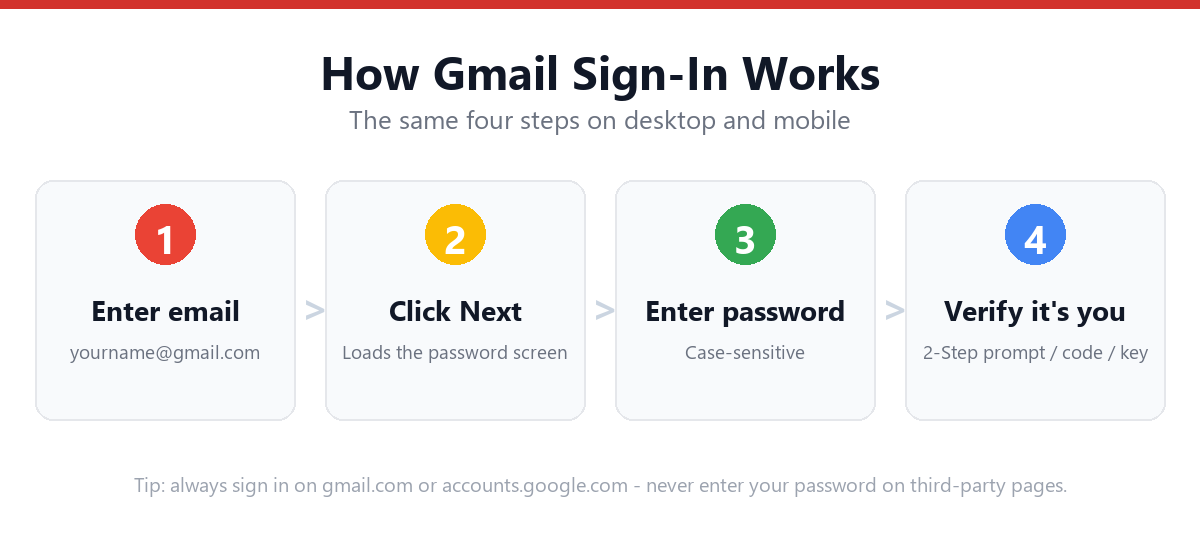
To sign in to Gmail on a computer, go to gmail.com, enter your address and password, and approve the second step on your phone.
- Go to gmail.comType it directly or use a bookmark.
- Enter your email or phoneThen select Next. Using several accounts? Select Use another account.
- Enter your passwordOr use a passkey if Google offers one.
- Approve the second stepTap Yes on your phone, enter a code, or use your security key.
- Choose whether to stay signed inOn a shared or public computer, don't save the password, and sign out afterwards from your profile picture → Sign out.
How do I log in to Gmail on my phone?
On Android, Gmail is built in and signs in with the phone's Google Account; on iPhone, install the Gmail app by Google LLC.
- Android: Gmail is preinstalled. If your phone already has your Google Account, the inbox opens automatically. To add another: open Gmail → profile picture → Add another account → Google.
- iPhone and iPad: install Gmail from the App Store (publisher Google LLC), tap Sign in, choose Google, and sign in. Apple Mail also works: Settings → Apps → Mail → Mail Accounts → Add Account → Google.
- Mobile browser: gmail.com works in Chrome or Safari if you prefer not to install an app.
Passkeys: signing in without a password
A passkey lets you sign in to Gmail with your phone's fingerprint, face scan or screen lock instead of typing a password. It is stored on your device and can't be phished, because it only works on Google's real sign-in page.
To create one: go to myaccount.google.com → Security → Passkeys and security keys → Create a passkey and follow the prompt on your device. Next time you sign in, Google offers the passkey first. You can still use your password as a backup.
2-Step Verification
2-Step Verification (2SV) adds a second check after your password, so a stolen password alone isn't enough.
| Second step | How it works | Best for |
|---|---|---|
| Google prompt | Tap Yes on a signed-in phone | Most people |
| Authenticator app | 6-digit code that changes every 30 seconds | Travel, no signal |
| Text or call code | Code sent to your phone number | Backup option |
| Security key or passkey | Physical key or device unlock | Highest protection |
| Backup codes | One-time codes you print | When you lose your phone |
Turn it on: myaccount.google.com → Security → 2-Step Verification → Get started. Save the backup codes offline as soon as you turn it on: they're how you get in if you lose your phone.
Gmail not working? Fixes
Most Gmail login problems are caused by a mistyped password, a second step you can't reach, or a browser extension, and each has a direct fix.
| Problem | Likely cause | Fix |
|---|---|---|
| "Wrong password" but you're sure it's right | Caps Lock, keyboard language, or a recently changed password | Check Caps Lock, type it in the address bar to see it, or reset at g.co/recover |
| "Couldn't find your Google Account" | Typo in the address | Check spelling; use find a forgotten address |
| No phone prompt arrives | Phone offline or Gmail app notifications off | Connect the phone to the internet, open the Gmail or Google app, or choose Try another way |
| Lost phone with 2SV | Second step unavailable | Use backup codes or a passkey on another device; otherwise account recovery |
| Gmail keeps loading | Browser extension or old cache | Open a private window; if that works, clear cache or disable extensions |
| "This browser may not be secure" | Old browser or embedded sign-in | Update the browser, or sign in from Chrome, Edge, Firefox or Safari |
| App says "Couldn't sign in" | Outdated app or wrong date/time on phone | Update Gmail; set date and time to automatic |
| Inbox opens but mail stopped arriving | Storage full | Free space at one.google.com/storage. See free Gmail account: storage |
| Gmail down for everyone | Google outage | Check the Google Workspace Status Dashboard and wait |
Signing out everywhere
If you used Gmail on a device you don't control, sign out remotely: myaccount.google.com → Security → Your devices → Manage all devices, select the device and choose Sign out. Changing your password also signs out every other session.
How this guide was made
Sign-in steps and security options come from Google's help pages listed below, checked on the date at the top of this page. The fix table is built from the sign-in problems readers most often searched for, matched to Google's documented solutions.
Frequently asked questions
What is the Gmail login page?
Go to gmail.com or www.gmail.com. It opens Google's sign-in page at accounts.google.com, the only real Gmail login page.
How do I sign in to Gmail on a new phone?
Install the Gmail app (Google LLC), tap Sign in, enter your address and password, and approve the prompt on your old phone or use a backup code.
How do I log in to Gmail without my phone?
Use a passkey on another device, a backup code, or choose Try another way. If none work, use g.co/recover from a device you've used before.
Why does Gmail keep asking me to verify it's me?
Google asks when a sign-in looks new, such as a new device, location or browser. Signing in from your usual device reduces these checks.
Is www.gmail.com the same as gmail.com?
Yes. Both open Gmail and use the same Google sign-in.
Should I use a passkey or 2-Step Verification?
Both protect you. A passkey is easier and can't be phished; keep 2-Step Verification backup codes for emergencies.
Sources
- Gmail Help: Sign in to GmailOfficial sign-in steps
- Google Account Help: Sign in with a passkeyPasskeys
- Google Account Help: Turn on 2-Step Verification2SV setup
- Google Account Help: Sign in with backup codesBackup codes
- Google Workspace Status DashboardOutage status
- FTC: Recognize and avoid phishing scamsFake sign-in pages