


Create Gmail Account: How to Sign Up for Gmail (Step by Step)
To create a Gmail account you need about five minutes, a name, a birth date and a username nobody has taken yet. This guide follows the real Gmail sign up screens on a computer, an Android phone and an iPhone, explains why Google sometimes asks for a phone number, and shows what to do when a screen won't let you continue.
Go to accounts.google.com/signup (or gmail.com → Create account → For my personal use). Enter your name, birthday and gender, choose a Gmail address, set a password, and complete the phone or email check if Google shows one. Agree to the terms and your inbox opens at gmail.com. On Android, use Settings → Google → Add account → Create account instead.
This opens the provider's official page. This guide never asks for your password, codes or personal details.
- Creating a Gmail account is free and happens only on accounts.google.com.
- Usernames need 6–30 characters: letters, numbers and periods. Google ignores periods, so jo.lee and jolee are the same address.
- A username that was ever used, even by a deleted account, is never given out again.
- Google decides case by case whether to ask for a phone number. See Gmail without a phone number.
- Add a recovery email or phone before you close the tab. It's how you get back in later.
Before you start: sign up or sign in?
People searching "gmail create account" often already have one. Pick your situation:
| You want to… | Go here |
|---|---|
| Make a brand-new Gmail address | Keep reading this guide |
| Open a Gmail inbox you already have | Gmail login |
| Get back into an account you can't open | Gmail account recovery |
| Sign up without giving a phone number | Create a Gmail account without a phone number |
| Know exactly what the free account includes | Free Gmail account |
Have ready: your real date of birth (most countries require you to be 13 or older), two or three username ideas, and a phone number or another email address you can receive a code on.
How to create a Gmail account on a computer
These are the screens most people see. Google tests small layout changes, so the order can shift slightly, but the information asked for is the same.
- Open the sign-up pageType
accounts.google.com/signupinto the address bar, or open gmail.com and choose Create account → For my personal use. Check that the address bar says accounts.google.com before typing anything. - Enter your first and last nameThis is the name people see when you email them. It is not your email address, and you can change it later.
- Enter your birthday and genderGoogle uses the birthday to apply age rules. "Rather not say" is an option for gender.
- Choose your Gmail addressPick one of Google's suggestions or select Create your own Gmail address. If the name is taken, Google says so instantly.
- Create a passwordUse at least 8 characters. A short phrase of three or four unrelated words is strong and easy to remember.
- Complete the verification screen if one appearsIt may ask for a phone number (code by text or call), show a QR code to scan with your phone, or let you Skip.
- Add a recovery emailOptional, but it is the easiest way back in if you forget your password.
- Review and agreeChoose express or manual personalisation, read the terms, and select I agree. Your new inbox opens.
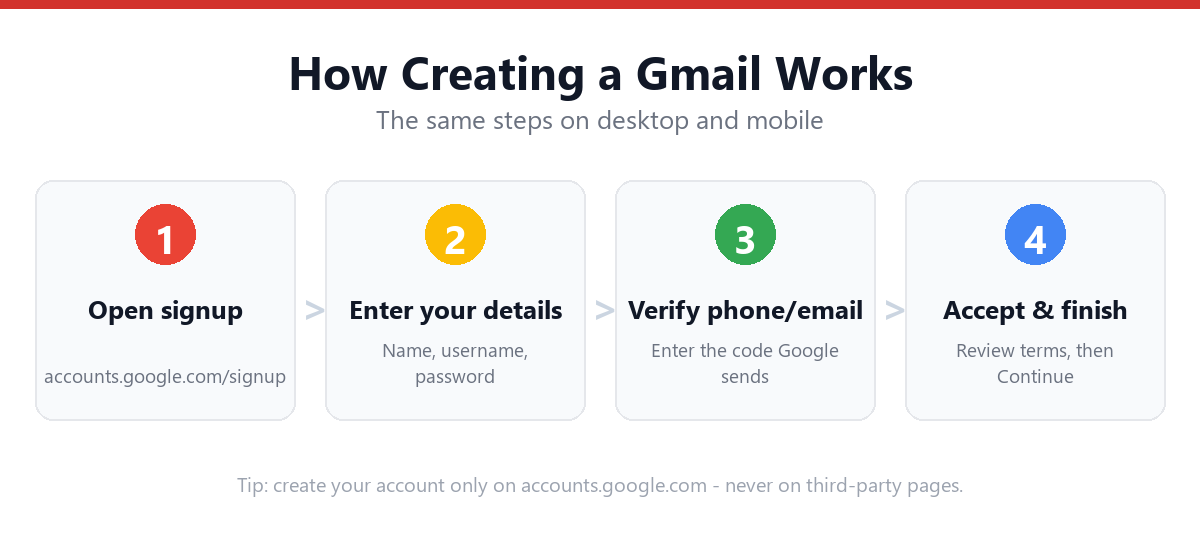
How to create a new Gmail account on a mobile phone
This is the most common way people sign up: "new gmail account create in mobile phone" was one of the most-clicked searches for this topic.
On Android (built into the phone):
- Open Settings → GoogleOn some phones it is Passwords & accounts or Accounts and backup → Manage accounts.
- Tap Add account → GoogleConfirm with your screen lock if asked.
- Tap Create account → For myselfThen fill in the same screens as on a computer.
- FinishThe account is added to the phone and appears in Gmail, Play Store and YouTube automatically.
On iPhone or iPad: install the Gmail app (publisher: Google LLC), tap Sign in → Google → Create account → For my personal use, and complete the screens. To also use it in Apple's Mail app: Settings → Apps → Mail → Mail Accounts → Add Account → Google.
On any phone without installing anything: open accounts.google.com/signup in Chrome or Safari. Use this on a borrowed phone, and sign out afterwards.
Choosing a Gmail username that works
Gmail's rules are stricter than most providers':
- 6–30 characters, using letters (a–z), numbers (0–9) and periods (.) only. No underscores, hyphens or plus signs.
- Periods and capital letters don't count:
Jordan.Lee,jordanleeandjor.dan.leeall reach the same inbox. - Used once, gone forever: Google never reissues a username, even after the account is deleted.
Gmail username format checker
Type only the part before the @ sign. This checks Google's published format rules in your browser; nothing is sent anywhere. Google ignores periods (john.smith and johnsmith are the same address) and never reissues a username that has been used before, even by a deleted account.
- • Between 6 and 30 characters
- • Only letters (a–z), numbers (0–9) and periods (.)
- • Starts and ends with a letter or number
- • No two periods in a row
If every idea is taken, these patterns usually find a free address on the first or second try:
| Pattern | Example | Good for |
|---|---|---|
| Middle initial | jordanklee | Personal use |
| Name + field | jordanleedesign | Freelancers, job applications |
| Name + city | jordanleelondon | Locals, professionals |
| Purpose word | hellojordanlee | A clean contact address |
Avoid birth years (they reveal personal data), long random numbers (they look like spam) and swapping letters for numbers (people will mistype it).
When Google asks for a phone number
Google decides during sign-up, based on signals such as your device, network and recent account creation from it. You might be asked to verify a number by text or call, asked to scan a QR code that sends a text from your phone, or allowed to skip. One phone number can only verify a limited number of accounts.
If you'd rather not give a number, the full method and its limits are in create a Gmail account without a phone number.
Never use public "receive SMS online" numbers or buy verified accounts. Anyone can read those codes, Google often rejects the numbers, and a seller keeps the recovery details of any account they sell you.
Gmail sign-up errors and how to fix them
Most Gmail sign-up errors come from a taken username, a symbol Google doesn't allow, or a phone number that has verified too many accounts.
| What you see | What it means | Fix |
|---|---|---|
| "That username is taken. Try another." | Someone has it, or had it | Use a pattern from the table above |
| "Sorry, only letters (a-z), numbers (0-9), and periods (.) are allowed" | A symbol slipped in | Remove underscores, hyphens or spaces |
| "This phone number has been used too many times" | The number reached Google's limit | Use a different number you own |
| "This phone number cannot be used for verification" | Google doesn't accept that number type | Use a regular mobile number |
| The code never arrives | Delay or wrong country code | Check the number, wait, then choose a call |
| "You do not meet the age requirements" | The birthday is under the minimum age | A parent can set up a supervised account with Google Family Link |
| The page won't continue after "I agree" | Blocked cookies or JavaScript | Allow cookies for google.com or try another browser |
Creating a second Gmail account
You can run several Gmail accounts side by side, for example one for work and one for shopping. In Gmail, select your profile picture → Add another account → Create account, then switch between inboxes from the same menu. Give each account its own recovery details. If you only want to filter mail, a plus address such as yourname+shop@gmail.com reaches your existing inbox without a new account.
What to do in the first ten minutes
The first ten minutes after you create a Gmail account are the best time to add recovery details and a passkey, before you forget the password.
- Run Google's Security CheckupAt
myaccount.google.com/security-checkup. Confirm your recovery phone and email. - Create a passkey or turn on 2-Step VerificationEither one stops almost every account takeover. See Gmail login.
- Write your exact address downIncluding every letter. Store the password in a password manager.
- Send yourself a test emailFrom another account, and reply to it.
- Bookmark gmail.comSign in there directly next time, never through ads in search results.
Google may delete personal accounts that haven't been used for two years. Signing in now and then keeps yours active.
Gmail or Outlook: which should you create?
Gmail and Outlook.com are both free and both start with 15 GB (shared with Drive and Photos on Gmail); the better choice depends on whether you use Google or Microsoft apps.
| Gmail | Outlook.com (Hotmail) | |
|---|---|---|
| Free storage | 15 GB shared across Gmail, Drive and Photos | 15 GB mailbox + 5 GB OneDrive |
| Works best with | Android, YouTube, Google Docs | Windows, Microsoft Office, Xbox |
| Username rules | Periods ignored, 6–30 characters | Periods count, up to 64 characters |
Both are free and secure, and many people keep one of each. To compare, see create a Hotmail account.
Frequently asked questions
How do I create a Gmail account?
Go to accounts.google.com/signup, enter your name, birthday and gender, choose an available username, set a password and complete any verification. Your inbox opens at gmail.com.
Is Gmail sign up free?
Yes. A personal Gmail account is free and includes 15 GB of storage shared across Gmail, Google Drive and Google Photos. See free Gmail account.
Can I create a Gmail account on my phone?
Yes. On Android use Settings → Google → Add account → Create account. On iPhone use the Gmail app, or accounts.google.com/signup in Safari.
Do I need a phone number to create a Gmail account?
Not always. Google may let you skip it, but it can require phone verification depending on its security checks.
Can I change my Gmail address after creating it?
Generally no. You can change your display name, but not the address. Choose carefully, or create a new account and forward mail to it.
How many Gmail accounts can I create?
Google doesn't publish a total, but it limits how many accounts one phone number can verify and how quickly one device can create them.
Sources
This guide was checked against Google's own help pages on the date shown at the top. Google controls the sign-up flow and may change screens or rules without notice.
- Gmail Help: Create a Gmail accountGoogle's official sign-up steps
- Gmail Help: Dots don't matter in Gmail addressesWhy periods are ignored
- Google Account Help: Sign in to multiple accountsRunning a second account
- Google Security CheckupSecure the new account
- Google Family LinkSupervised accounts for children