


Create Gmail Account Without Phone Number: What Works and What Doesn't
You can often create a Gmail account without a phone number, but not always, and nobody can guarantee it. Google decides on each sign-up whether to ask for a number. This guide explains how that decision works, what raises your chances of seeing a Skip option, the honest alternatives when the number is required, and why the "free SMS number" shortcuts end badly.
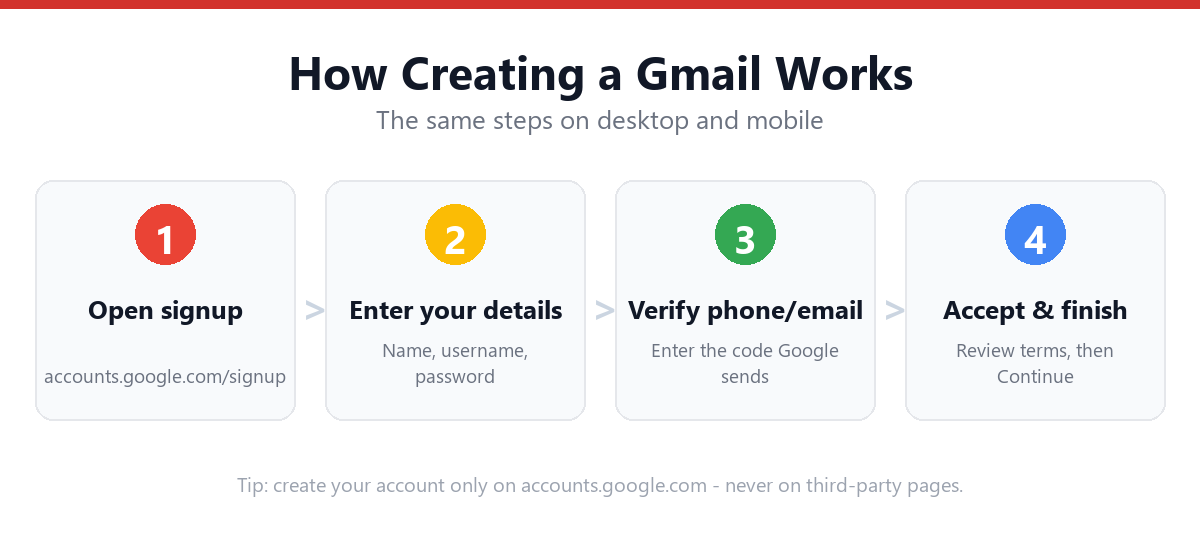
Start at accounts.google.com/signup on a device and network you normally use. If the phone screen shows Skip, select it and add a recovery email instead. If no Skip appears, Google requires a number for that attempt. Use a number you own, or one from someone you trust (it isn't shown publicly and can be removed later). Don't use public SMS-receiving websites.
This opens the provider's official page. This guide never asks for your password, codes or personal details.
The short answer
You can often create a Gmail account without a phone number, but Google decides on each sign-up and can't be forced to show Skip.
| Question | Answer |
|---|---|
| Is a phone number always required? | No. Google often shows a Skip option. |
| Can you force the Skip option to appear? | No. Google decides from security signals. Some things make it more likely. |
| Is the number shown to other people? | No. It's used for verification and recovery only. |
| Can you remove the number later? | Yes, in myaccount.google.com → Personal info → Phone. |
| Are "receive SMS online" sites safe? | No. Anyone can read the codes and Google often blocks those numbers. |
Why Google asks for a phone number at all
Phone verification is one of Google's main defences against accounts made in bulk for spam and fraud. A real phone number is costly to fake at scale, so Google asks for one when a sign-up looks unusual. That's why the same person can see the phone screen once and not the next time.
Signals that make the phone step more likely:
- Several accounts created from the same device, browser or Wi-Fi recently
- A VPN, proxy or shared public network (library, hotel, office)
- A private or incognito window with no browsing history
- An age under 18 entered on the birthday screen in some countries
- Very fast form filling, which looks automated
How to improve your chances of seeing "Skip"
None of these is a guarantee. They simply remove the signals above.
- Use your own phone or computerA device you've used for a while, in a normal (not private) browser window.
- Use your home connectionTurn off any VPN or proxy. Avoid public Wi-Fi.
- Don't create several accounts in a rowIf you just made one, wait a few days before the next.
- Fill the form at a normal paceReal name, real birthday.
- Look carefully at the phone screenIf present, the Skip link is usually small and below the number box.
- Add a recovery email insteadThis keeps the account recoverable without a phone.
On Android, adding an account through Settings → Google → Add account → Create account sometimes asks for less, because the phone itself is already a trusted device. Step-by-step instructions for every device are in create a Gmail account.
If the number is required: honest options
When Google requires a phone number, five legitimate options remain, and you can remove the number from your account afterwards.
| Option | How it works | Things to know |
|---|---|---|
| Your own mobile number | Verify, then remove it later if you want | The simplest choice. You can remove it from your account afterwards |
| A trusted family member's number | They read you the code | One number can only verify a limited number of accounts |
| QR code verification | Google may show a QR code; scanning it sends a text from your phone | Still uses a phone, but no code is typed in |
| Try again later on your usual device | The signals may be different next time | Free, but not guaranteed |
| Google Family Link (under 13) | A parent creates a supervised account | Uses the parent's details, not the child's |
After verifying, you can remove the number: go to myaccount.google.com → Personal info → Phone, select the number and remove it. Keep a recovery email in its place, otherwise getting back in after a forgotten password becomes much harder.
Shortcuts that don't work (or put you at risk)
Public SMS numbers, bought accounts and temporary virtual numbers all hand control of your Gmail account to someone else.
Public "receive SMS online" numbers: the codes are visible to everyone on the site. Anyone can later use the same number to try a password reset on your account. Google also rejects most of these numbers as overused.
- Buying "phone-verified" or "PVA" Gmail accounts: the seller keeps the recovery details and can take the account back. Bulk-made accounts break Google's terms and are regularly disabled.
- Temporary virtual numbers from random apps: they are often recycled to other users, so the next owner can receive your codes.
- Fake or made-up numbers: the code never arrives, and repeated failed attempts can make Google stricter on that device.
The FTC's guide to two-factor authentication explains why codes sent to a phone are only as safe as the number itself. It's the same reason a number you don't control is risky.
Keeping a phone-free account safe
Without a recovery phone, your recovery email and sign-in method carry more weight:
- Add a recovery email you'll keep for years, not a temporary inbox.
- Create a passkey on your own device (myaccount.google.com → Security → Passkeys). It works without a phone number. See Gmail login: passkeys.
- Save backup codes from the 2-Step Verification page and store them offline.
- Sign in from the same device regularly. Google trusts devices it recognises during recovery.
If you ever lose access, follow Gmail account recovery. Recovery without a phone works best from a device and location you've used before.
How this guide was made
This guide is based on Google's published help on verification and account recovery, listed below, checked on the date at the top of this page. Google doesn't publish its exact rules for the phone step, so we describe the signals it has documented and say where results vary. We don't recommend or link to any number-renting or account-selling service.
Frequently asked questions
Can I create a Gmail account without a phone number in 2026?
Often yes. If Google shows a Skip option on the phone screen you can continue without one. If it doesn't, a number is required for that attempt.
Why is there no Skip button on the phone screen?
Google detected a signal that raised its security check, such as a VPN, a shared network or several recent sign-ups from the same device. Try later on your usual device and home connection.
Can I use someone else's phone number?
Yes, if they agree and you trust them. The number isn't shown on your account publicly, and you can remove it after verification.
Can I remove my phone number from Gmail later?
Yes. Go to myaccount.google.com → Personal info → Phone and remove it, then make sure a recovery email is set.
Is it safe to use a free online SMS number for Gmail?
No. Anyone can read codes sent to those numbers, and Google usually rejects them.
Does the Gmail app on iPhone need a phone number?
The rules are the same on every device: Google decides per sign-up. The phone itself doesn't change the requirement.
Sources
- Google Account Help: Verify your accountWhy Google asks for verification
- Gmail Help: Create a Gmail accountOfficial sign-up steps
- Google Account Help: Set a recovery phone and emailRecovery options
- Google Account Help: Sign in with a passkeyPhone-free secure sign-in
- FTC: Use two-factor authentication to protect your accountsWhy the phone number matters