


Hotmail Login: How to Sign In to Hotmail (Outlook.com)
Typing hotmail.com or www.hotmail.com still works: it takes you to Outlook.com, where every Hotmail inbox now lives. This Hotmail login guide shows the real sign-in page, how to sign in on a computer and phone, and what to do when you forget the password, Microsoft locks the account, or Hotmail just won't open.
Go to outlook.live.com (hotmail.com redirects there). Select Sign in, enter your full @hotmail.com address, then your password or approve the request in the Microsoft Authenticator app. On phones, use the Microsoft Outlook app. Forgot your password? Use account.live.com/password/reset.
This opens the provider's official page. This guide never asks for your password, codes or personal details.
Hotmail is now Outlook.com
Microsoft replaced the Hotmail website with Outlook.com, finishing the move in 2013, but kept every address working. Your @hotmail.com address, emails and contacts are unchanged. Only the website name and look are different. The same applies to old @live.com and @msn.com addresses.
| You type | You end up at | Is it real? |
|---|---|---|
| hotmail.com / www.hotmail.com | outlook.live.com | Yes |
| outlook.com | outlook.live.com | Yes |
| login.live.com | Microsoft account sign-in | Yes |
| Anything else asking for your Hotmail password | Unknown | Close it |
How do I sign in to Hotmail on a computer?
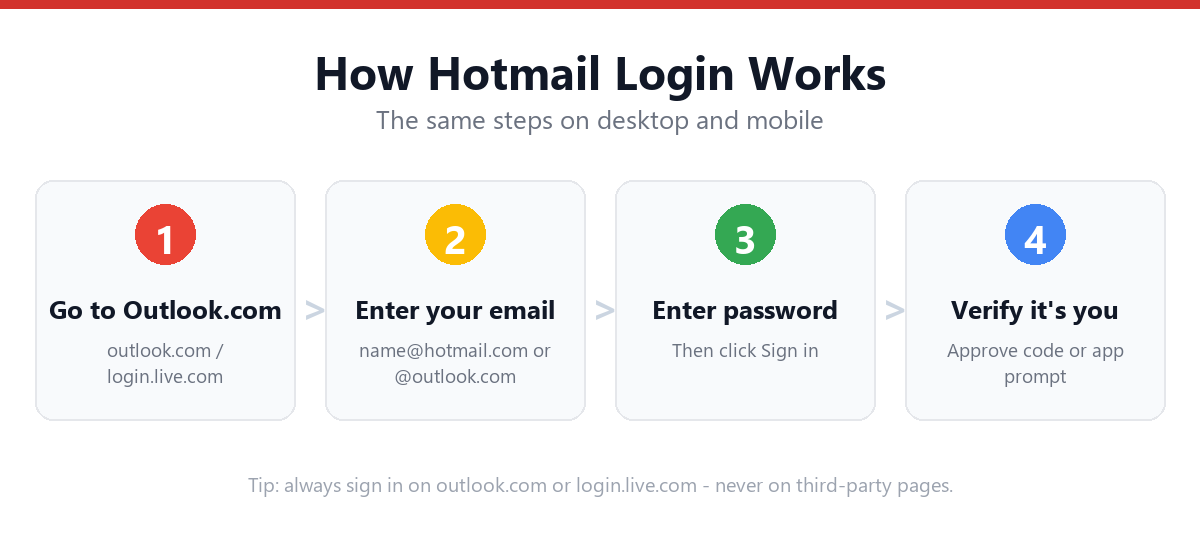
To sign in to Hotmail on a computer, go to outlook.live.com, enter your full @hotmail.com address and password, and complete any security check.
- Go to outlook.live.comOr type hotmail.com; it redirects there.
- Select Sign inEnter your full address, including @hotmail.com.
- Enter your passwordOr approve the number shown on screen in the Microsoft Authenticator app if you use passwordless sign-in.
- Enter a security code if askedSent to your security phone or alternate email.
- "Stay signed in?"Choose Yes only on your own computer. Your inbox opens.
Hotmail login on phone
Recommended: the Microsoft Outlook app (publisher Microsoft Corporation, free on Android and iPhone). Open it, tap Add account, enter your @hotmail.com address and sign in.
iPhone Mail app: Settings → Apps → Mail → Mail Accounts → Add Account → Outlook.com. Android Gmail app: profile picture → Add another account → Outlook, Hotmail and Live.
Browser: outlook.live.com works in any mobile browser without installing an app.
Forgot your Hotmail password
A forgotten Hotmail password is reset at account.live.com/password/reset with a code sent to your security phone or alternate email.
- Go to account.live.com/password/resetOr select Forgot password? on the sign-in page.
- Enter your Hotmail address
- Choose where to get a code Your security phone or alternate email listed on the account.
- Enter the code and create a new passwordAt least 8 characters, different from passwords you use elsewhere.
No access to your security phone or email? Choose I don't have any of these. Microsoft opens its account recovery form (account.live.com/acsr). Fill it in from a device and location you normally use, and include as much as you remember: old passwords, subjects of recent emails, and contacts you emailed. Microsoft replies within 24 hours to an email address you can check now.
Hotmail account locked
"Your account has been locked" means Microsoft saw activity that may break its services agreement, often a burst of sent emails or a sign-in from an unfamiliar place.
- Sign in at outlook.live.com and follow the Next prompt.
- Enter a phone number to receive a security code. It doesn't need to be the number on your account, but one number can unlock only a limited number of accounts.
- Enter the code, then change your password and review your security info.
If no code arrives, wait and try again, or use a different phone. Microsoft won't unlock accounts through outside services. Anyone charging to do it is running a scam.
Hotmail not working? Fixes
Most Hotmail login problems come from a typo in the address, an old saved password, or blocked cookies on live.com and microsoft.com.
| Problem | Likely cause | Fix |
|---|---|---|
| "That Microsoft account doesn't exist" | Typo, or the account was closed after a long period without sign-ins | Check the spelling; try @live.com or @outlook.com if unsure |
| "Your account or password is incorrect" | Caps Lock, old password saved in the browser | Retype it; then reset the password |
| Sign-in page loops back | Cookies blocked or a stale session | Allow cookies for live.com and microsoft.com, or open a private window |
| No security code | Old phone number on the account | Choose another option or I don't have any of these |
| Outlook app won't sync | Outdated app or expired sign-in | Update the app; remove and re-add the account |
| Mail not arriving | Mailbox full or rules moving mail | Check storage in Settings → General → Storage, and Settings → Mail → Rules |
| Outlook.com down | Microsoft service issue | Check the Microsoft 365 service status page |
Secure your Hotmail account
Four settings at account.microsoft.com/security protect a Hotmail account from takeover and from being closed for inactivity.
- At account.microsoft.com/security, add a current phone number and a second email.
- Turn on two-step verification, or go passwordless with the Microsoft Authenticator app.
- Review Sign-in activity for locations you don't recognise.
- Sign in at least once a year. Microsoft can close personal accounts after a long period without sign-ins, and the address can be released.
Microsoft never asks for your password by email, text or phone call. Emails warning that your Hotmail "will be closed today" unless you click a link are phishing. Report them in Outlook with Report → Report phishing.
Need a new account instead?
If the account is gone for good, you can open a new address in a few minutes. See create a Hotmail account. Prefer Google? See Gmail login.
How this guide was made
Sign-in, reset and unlock steps follow Microsoft's support pages listed below, checked on the date at the top of this page. The fix table matches the Hotmail sign-in problems people searched for most to Microsoft's documented solutions.
Frequently asked questions
How do I log in to my Hotmail account?
Go to outlook.live.com (or hotmail.com, which redirects there), select Sign in, enter your full @hotmail.com address and password, and complete any security check.
Does hotmail.com still work?
Yes. hotmail.com and www.hotmail.com redirect to Outlook.com, where Hotmail inboxes are now read.
Is Hotmail login the same as Outlook login?
Yes. A Hotmail address signs in on the same Outlook.com sign-in page with the same Microsoft account.
How do I recover my Hotmail account without a phone number?
Select Forgot password, then I don't have any of these, and complete Microsoft's account recovery form from a device and location you normally use.
Why is my Hotmail account locked?
Microsoft locks accounts after unusual activity, such as many emails sent quickly or a sign-in from an unexpected place. Verify with a phone code to unlock it.
Can I sign in to Hotmail on my iPhone?
Yes. Use the Microsoft Outlook app, or add an Outlook.com account in Settings → Apps → Mail.
Sources
- Microsoft Support: How to sign in to HotmailOfficial sign-in help
- Microsoft: Reset your passwordPassword reset
- Microsoft Support: Sign-in helperRecovery when you can't sign in
- Microsoft Support: Verification code problemsWhen the code doesn't arrive
- Microsoft account securitySecurity info and sign-in activity
- Wikipedia: Outlook.comHistory of Hotmail and Outlook.com
- FTC: Recognize and avoid phishing scamsPhishing warnings