


Free Gmail Account: What's Included and How to Open One
A free Gmail account costs nothing to open or keep, and it's also a full Google account: 15 GB of storage, Drive, Docs, Photos, Meet and YouTube all come with it. This guide explains exactly what's free, where the limits are, how a free account compares with paid Google One and Google Workspace, and which "free account" offers online are scams.
Yes, Gmail is free. Open an account at accounts.google.com/signup. You get a @gmail.com address, 15 GB of storage shared across Gmail, Google Drive and Google Photos, plus Docs, Sheets, Slides, Calendar and Meet. You never need to enter payment details. Paid plans (Google One for extra storage, Google Workspace for a business domain) are optional.
This opens the provider's official page. This guide never asks for your password, codes or personal details.
Is Gmail really free?
Yes. Google has never charged for a personal Gmail account. You can open it, use it every day and keep it for years without entering a card. Gmail is funded by advertising (some ads appear in the Promotions and Social tabs) and by optional upgrades.
The account you open is a Google Account, so the same free sign-in works across Google's services:
| Included free | What you can do with it |
|---|---|
| Gmail | Email with spam and phishing filtering, labels, filters and search |
| Google Drive | Store and share files and folders |
| Docs, Sheets, Slides, Forms | Write, calculate and present; open and save Microsoft Office files |
| Google Calendar and Contacts | Events, reminders and an address book that sync to your phone |
| Google Meet | Video calls (longer group calls are time-limited on the free plan) |
| Google Photos | Photo and video backup (counts toward storage) |
| YouTube, Google Play, Maps | Subscriptions, app downloads, saved places with one login |
How to open a free Gmail account
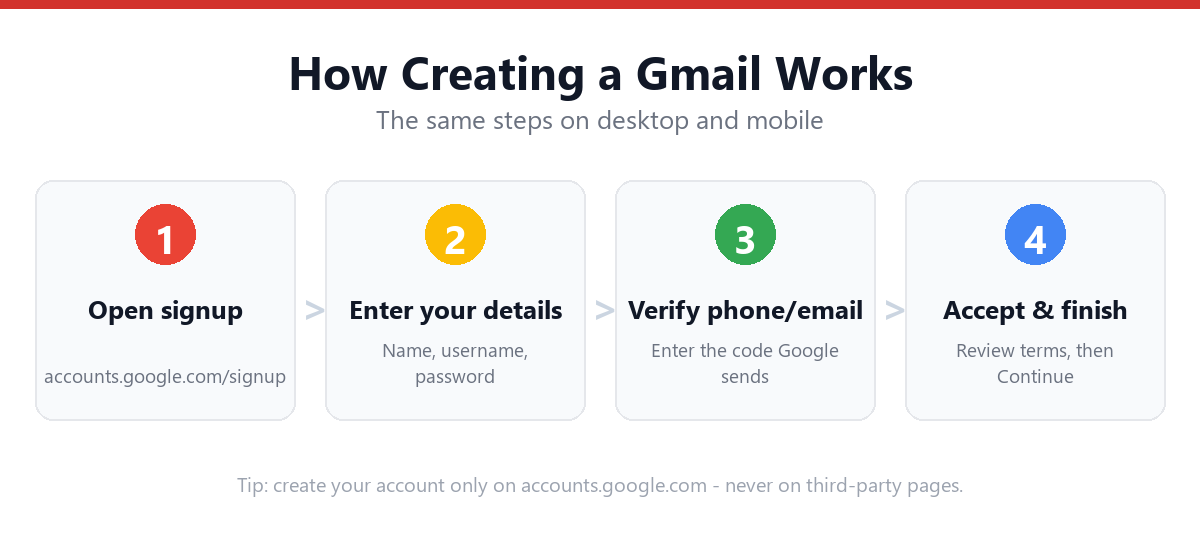
You open a free Gmail account at accounts.google.com/signup in about five minutes, with no payment details.
- Go to accounts.google.com/signupChoose For my personal use if asked.
- Enter your name, birthday and gender
- Choose a username 6–30 letters, numbers and periods. Taken names are never released, so have a few ideas ready.
- Set a password and complete verificationGoogle may ask for a phone code, or let you skip it.
- Add a recovery email and agree to the termsYour inbox opens straight away.
Every screen, including phone sign-up and username tips, is explained in create a Gmail account. If you don't want to give a number, see Gmail without a phone number.
How the 15 GB of free storage works
The 15 GB is one pool shared by three services: every email and attachment in Gmail (including Spam and Trash until they empty), every file in Google Drive, and every photo backed up to Google Photos. Light email use rarely fills it. Automatic phone photo backup is what usually does.
You can see exactly what uses your space at one.google.com/storage. When the pool is full, Drive and Photos stop accepting uploads and Gmail stops receiving new email: senders get a bounce message. To free space quickly:
- Search Gmail for
larger:10Mand delete large attachments you don't need. - Empty Trash and Spam.
- Switch Google Photos to Storage saver quality.
- Move old Drive files to your computer or an external drive.
What are the limits of a free Gmail account?
A free Gmail account has four practical limits: 25 MB attachments, a daily sending cap, no custom domain, and deletion after two years of inactivity.
| Limit | Free Gmail | Why it matters |
|---|---|---|
| Sending an attachment | 25 MB per email | Larger files are sent as a Google Drive link automatically |
| Daily sending | Capped to stop spam | Normal personal use never gets close; bulk mailing isn't allowed |
| Custom address (you@yourcompany.com) | Not available | Needs Google Workspace (see below) |
| Inactivity | Account may be deleted after 2 years unused | Sign in occasionally to keep it |
Free Gmail vs Google One vs Google Workspace
Free Gmail suits personal use, Google One adds storage to the same address, and Google Workspace gives a business its own domain.
| Free Gmail | Google One | Google Workspace | |
|---|---|---|---|
| Cost | Free | Monthly or yearly subscription | Per user, per month |
| Address | name@gmail.com | name@gmail.com | you@yourcompany.com |
| Storage | 15 GB | More storage, shareable with family | Pooled business storage |
| Who it's for | Personal use | Personal users who run out of space | Businesses with their own domain |
| Admin console and shared addresses | No | No | Yes (info@, sales@, user management) |
Prices vary by country and change over time, so check Google One and Google Workspace's own pages before buying. Upgrade only if you hit a real limit. For most people the free account is all they need.
Business email on Gmail: sign up at workspace.google.com, connect or buy a domain, verify it with a DNS record, add Google's MX records, then create users. Add SPF, DKIM and DMARC records so your mail lands in inboxes. Free Gmail can't use a custom domain.
Is Gmail the best free email account?
Gmail is the most common free email account, but not the only good one. The right choice depends on the apps you already use:
| Free Gmail | Free Outlook.com (Hotmail) | |
|---|---|---|
| Storage | 15 GB shared across Gmail, Drive and Photos | 15 GB for email, plus 5 GB of OneDrive |
| Best with | Android, YouTube, Google Docs | Windows, Xbox, Microsoft Office |
| Addresses | @gmail.com | @outlook.com or @hotmail.com |
| Ads | In the Promotions and Social tabs | In the inbox list |
If you prefer Microsoft, see create a Hotmail account. Many people keep one of each, one for personal mail and one for sign-ups.
"Free Gmail accounts with password" offers are scams
Many sites and social media posts offer "free Gmail accounts with password", "unlimited Gmail accounts" or "accounts without verification". Don't use them. These accounts are either stolen, bulk-created against Google's rules, or still controlled by the seller through the recovery phone and email. The seller can take them back at any time, read everything you receive, and Google regularly disables them, along with anything you've linked to them.
The safe way to get a free Gmail account is the one above: open your own at accounts.google.com in about five minutes. The FTC's guidance on recognising phishing scams explains the same warning signs.
Google never charges for a Gmail account and never asks for your password or verification codes. Any page that asks for payment, or for a code, to "activate" a free account is not Google.
Who should rely on a free account
It's a good fit if you need a personal address for everyday life, job applications or shopping; use an Android phone (a Google Account runs the Play Store); want free document editing; or are a student keeping something that outlasts a school account.
Consider paying if you run a business and want your own domain, regularly run out of space because of photos, or need shared inboxes and admin control for a team.
How this guide was made
We checked every claim against Google's help pages listed below on the date at the top of this page, and we update the guide when Google changes its plans or limits. Storage figures and plan names are Google's published ones. We don't sell accounts or take payment from Google.
Frequently asked questions
Is Gmail free to use?
Yes. A personal Gmail account is free to open and keep, with 15 GB of storage shared across Gmail, Drive and Photos.
How do I make a free email account?
The quickest way is a free Gmail account at accounts.google.com/signup. Outlook.com is another free option. See create a Hotmail account.
Can I get a free Gmail account with a password from a website?
No. Ready-made accounts with passwords are stolen or still controlled by the seller, and Google disables them. Open your own account for free instead.
Will Google ever charge for my free account?
Personal Gmail remains free. Only extra storage (Google One) and business features (Google Workspace) are paid.
Does a free Google account include Google Docs?
Yes. Docs, Sheets, Slides and Forms are all included free.
What happens if I don't use my free Gmail account?
Google may delete personal accounts with no activity for two years. Signing in occasionally keeps it active.
Sources
- Gmail Help: Create a Gmail accountOfficial sign-up steps
- Google Drive Help: How storage worksThe shared 15 GB
- Google Account Help: Inactive account policyThe two-year rule
- Google One storage managerSee and free up space
- Google WorkspaceBusiness email on your own domain
- FTC: How to recognize and avoid phishing scamsConsumer protection guidance