


Hotmail Create Account: How to Sign Up for a New Hotmail Address
Hotmail became Outlook.com more than a decade ago, but Microsoft still gives out @hotmail.com addresses. When you create a Hotmail account, you're actually creating a free Microsoft account and choosing "hotmail.com" from a small dropdown that most people miss. This guide shows where that dropdown is, how Hotmail sign up works on a computer and on a phone, and what to do when Microsoft rejects a name or asks for a phone number.
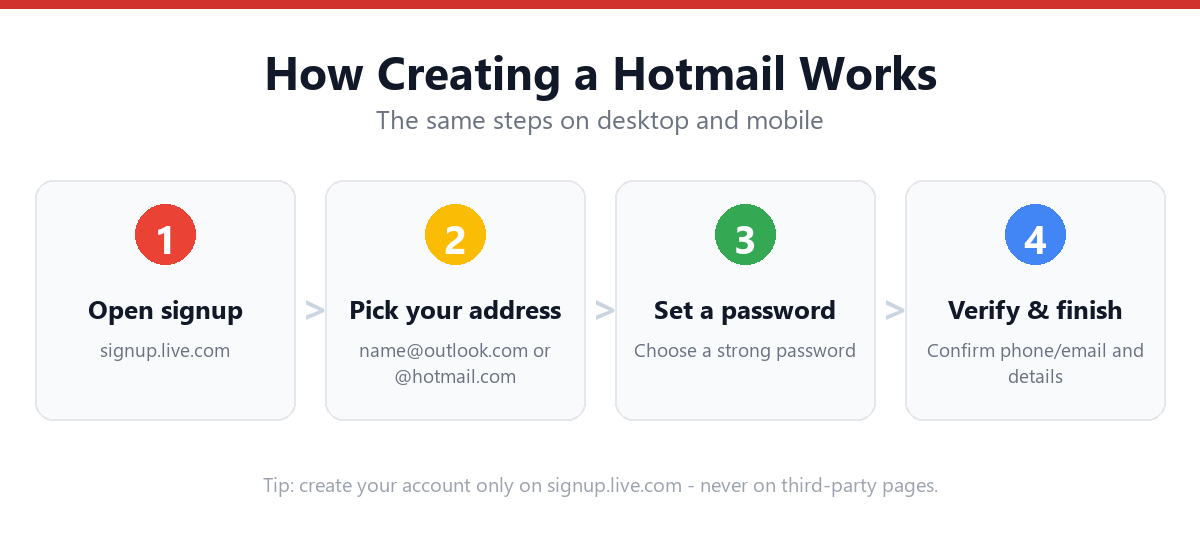
Go to signup.live.com (or outlook.com → Create free account). Type the name you want, then open the @outlook.com dropdown and change it to @hotmail.com. Create a password, enter your name, country and birth date, solve the short puzzle, and your inbox opens at outlook.com. It's free. You sign in to it at outlook.live.com.
This opens the provider's official page. This guide never asks for your password, codes or personal details.
Can you still create a Hotmail account?
Yes. Microsoft moved Hotmail users to Outlook.com in 2013 and stopped using the Hotmail name for the service, but not for the addresses. A new account can end in @hotmail.com or @outlook.com, and both get exactly the same mailbox, storage and apps. The only difference is the text after the @.
| @hotmail.com | @outlook.com | |
|---|---|---|
| Cost | Free | Free |
| Where you read mail | outlook.com and the Outlook app | outlook.com and the Outlook app |
| Name availability | Many short names still free | Many short names taken |
| Impression | Familiar, long-established | Newer, looks more current |
Pick whichever reads better with your name. If your first choice is taken on one domain, try the other one, since they are separate.
How do I sign up for Hotmail on a computer?
Hotmail sign-up on a computer takes about five minutes at signup.live.com; the key step is switching the domain dropdown to hotmail.com.
- Open signup.live.comOr go to outlook.com and choose Create free account. Make sure the address bar shows a microsoft.com, live.com or outlook.com address.
- Type your new addressEnter the part before the @. Then select the domain dropdown on the right and choose hotmail.com.
- Create a passwordAt least 8 characters, using two of: uppercase, lowercase, numbers, symbols.
- Enter your first and last nameThis is what people see in their inbox.
- Choose your country and birth dateThese set age rules and your account region.
- Complete the human checkUsually a short visual puzzle. Some sign-ups also get a phone or email code.
- Stay signed in?Choose Yes only on your own device. Your Hotmail inbox opens.
Hotmail sign up on a phone
Outlook app (Android and iPhone): install Microsoft Outlook (publisher: Microsoft Corporation), tap Create new account, and follow the same screens. Change the domain to hotmail.com on the address screen.
Without installing anything: open signup.live.com in Chrome or Safari. Once the account exists, add it to your phone's mail app: on iPhone, Settings → Apps → Mail → Mail Accounts → Add Account → Outlook.com; on Android, open the Outlook or Gmail app and add an Outlook, Hotmail and Live account.
Pick a Hotmail username that gets accepted
Microsoft's rules are looser than Gmail's:
- Letters, numbers, periods, underscores and hyphens are allowed.
- It must start with a letter. Up to 64 characters before the @.
- Periods count:
sam.ortiz@hotmail.comandsamortiz@hotmail.comare different addresses.
Hotmail / Outlook username format checker
Type only the part before the @ sign. This checks Microsoft's published format rules in your browser; nothing is sent anywhere. Only Microsoft's signup page can confirm availability and which endings (usually @outlook.com, sometimes @hotmail.com) are offered.
- • Between 1 and 64 characters
- • Starts with a letter
- • Only letters, numbers, periods (.), hyphens (-) and underscores (_)
- • Does not end with a period
- • No two periods in a row
"Someone already has this email address"? Change one thing at a time: switch to the other domain, add a middle initial, add your profession or city, or use a period or underscore between names. Microsoft can also release addresses from accounts closed long ago, so a name that was taken years ago is occasionally free again.
Do you need a phone number?
Not always. Microsoft usually asks for a puzzle first and only asks for a phone number or a second email when a sign-up looks risky: several new accounts from one connection, a VPN, or a mismatch between your country and your network. If you're asked:
- Use a number you own or another email address you can open. The number is used for security codes, not shown on your profile.
- If you'd rather not, close the page and try later on your usual device and home Wi-Fi, where a phone request is less likely.
- Don't use public SMS-receiving websites. Anyone can read those codes, including the code to reset your password later.
Hotmail sign-up errors
Hotmail sign-up errors usually mean the name is taken on that domain, the address starts with a number, or Microsoft flagged the connection.
| Message | Cause | What to do |
|---|---|---|
| "Someone already has this email address" | Name taken on that domain | Try the other domain or a variation |
| "Enter a valid email address" | Starts with a number or has a space or unsupported symbol | Start with a letter; use only letters, numbers, . _ - |
| "Your password isn't strong enough" | Too short or one character type | 8+ characters, mix types |
| Puzzle keeps failing | Slow connection or blocked scripts | Try the audio puzzle, another browser, or turn off script blockers |
| "We've detected something unusual" | Too many sign-ups from one network | Wait and try later from your own connection |
| "You must be at least…" | Birth date below the minimum age | Use Microsoft Family Safety with a parent's account |
Free vs business Hotmail
A personal Hotmail account is free: a 15 GB mailbox plus 5 GB of OneDrive storage, with the web versions of Word, Excel and PowerPoint. A paid Microsoft 365 Personal or Family plan adds more storage and the desktop apps, but keeps the @hotmail.com address.
For an address on your own domain, such as you@yourbusiness.com, you need Microsoft 365 Business, not Hotmail. You sign up at microsoft.com, verify the domain with a DNS record, point its MX records to Microsoft, and create mailboxes for each person. Hotmail itself can't use a custom domain.
After you sign up
Four quick steps after Hotmail sign-up keep the new account recoverable and stop Microsoft closing it for inactivity.
- Add security info at account.microsoft.com/security: a phone number or a second email. Without one, a forgotten password can mean a lost account.
- Turn on two-step verification or use the Microsoft Authenticator app for passwordless sign-in.
- Sign in at least once a year. Microsoft can close a personal account after a long period without sign-ins, and the address may be released.
- Bookmark outlook.live.com. That's the real Hotmail sign-in page. See Hotmail login.
Hotmail or Gmail?
Hotmail fits best if you use Windows, Xbox, Skype or Microsoft Office. Gmail fits best with Android, YouTube and Google Docs. Both are free. Gmail's 15 GB is shared with Drive and Photos, while Hotmail keeps a separate 15 GB for email. To compare the sign-up, see create a Gmail account and what a free Gmail account includes.
How this guide was made
We followed Microsoft's sign-up flow on a computer and in the Outlook app and checked the details against Microsoft's support pages listed below, on the date at the top of this page. Microsoft changes screens from time to time; the information asked for stays the same.
Frequently asked questions
How do I create a Hotmail account?
Go to signup.live.com, type your new address, change the domain dropdown to @hotmail.com, create a password, enter your name, country and birth date, and solve the puzzle. Your inbox opens at outlook.com.
Is a Hotmail account free?
Yes. A personal Hotmail account is free, with a 15 GB mailbox and 5 GB of OneDrive storage.
Can I still get an @hotmail.com address in 2026?
Yes. Choose hotmail.com instead of outlook.com in the domain dropdown during sign-up.
Is Hotmail the same as Outlook?
Yes. Hotmail is now Outlook.com. A @hotmail.com address signs in and reads mail at outlook.com.
Can I create a Hotmail account without a phone number?
Often yes. Microsoft usually asks only for a puzzle, and asks for a phone number or second email when a sign-up looks unusual.
Where do I sign in after creating my Hotmail account?
At outlook.live.com, or in the Outlook app. See Hotmail login.
Sources
- Microsoft Support: How to create a new Microsoft accountOfficial sign-up help
- Microsoft Support: Get help with Outlook.comMailbox, storage and settings help
- Microsoft account securityAdd security info
- Wikipedia: Outlook.comHistory of Hotmail and Outlook.com
- Microsoft Support: Add security info to your Microsoft accountKeep the account recoverable
- Microsoft 365 BusinessEmail on your own domain
- FTC: Recognize and avoid phishing scamsSafety guidance