Create a Free Gmail Account: What's Actually Free (2026)
A Gmail address costs nothing: no card, no trial, no expiry. The one thing worth understanding before you sign up is how the free 15 GB is shared.
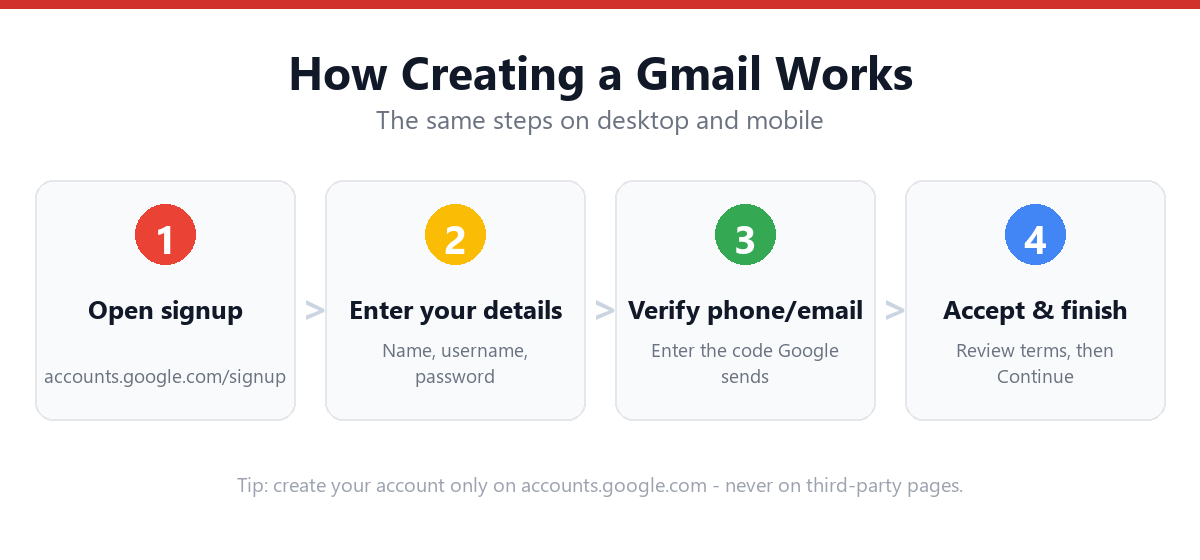
Yes. A Gmail account is completely free, and no payment method is requested at any point. Go to accounts.google.com/signup, choose "For my personal use," enter your name, date of birth, and a username ending in @gmail.com, set a password, and verify. It takes about three minutes. The free account includes 15 GB of storage shared across Gmail, Google Drive and Google Photos, the key difference from Outlook, which counts mailbox and cloud storage separately. You also get free web versions of Docs, Sheets and Slides, and a Google account that signs you into YouTube, Drive, Calendar and Play. Google only charges if you later want a Google One plan for more storage, or Google Workspace for email on your own domain.
- Free permanently: no card at signup, nothing to cancel.
- 15 GB is shared across Gmail, Drive and Photos, not per-service.
- Usernames are 6–30 characters, letters/numbers/periods only, and permanent.
- Gmail ignores dots, so they can't free up a name someone already has.
- Free accounts see ads in the Promotions and Social tabs.
Is Gmail Really Free, or Is There a Catch?
Gmail is free in the ordinary sense of the word: there is no payment step in the signup flow, no trial that converts, and no date on which the account stops working. You can create one today and use it for a decade without paying anything.
The reason people search for confirmation is usually one of these:
- Google One prompts. Once your storage starts filling, Google offers paid Google One plans. This is an upgrade offer, not a bill. Declining it leaves your account exactly as it is.
- Google Workspace confusion. Workspace is Google's paid product for businesses that want email at a custom domain (you@yourcompany.com). It's a different product from a free personal @gmail.com account. If a page is quoting you a per-user monthly price, you're looking at Workspace.
- Ads. Free Gmail shows ads in the Promotions and Social tabs. They look like emails but are labelled. This is how the free tier is funded.
What Do You Actually Get for Free?
| What | Free account | Notes |
|---|---|---|
| Email address | ✓ Unlimited use | @gmail.com only; no other domain choice |
| Storage | 15 GB shared | Gmail + Drive + Photos combined |
| Docs, Sheets, Slides | ✓ Free web versions | Files don't count toward the 15 GB |
| Google account | ✓ Included | YouTube, Drive, Calendar, Photos, Play |
| Spam filtering | ✓ Included | Widely regarded as best-in-class |
| 2-Step Verification | ✓ Included | Security is never paywalled |
| Aliases via dots and +labels | ✓ Unlimited | Filtering trick, not extra addresses |
| Offline access | ✓ Included | Enable in Gmail settings |
| Ad-free inbox | ✗ Paid only | Ads in Promotions/Social tabs |
| Custom-domain email | ✗ Paid only | Requires Google Workspace |
| More than 15 GB | ✗ Paid only | Requires Google One |
One genuinely useful detail: files created in Docs, Sheets and Slides do not count against your 15 GB. Only uploaded files, photos, and email do. If you work in Google's own formats, the free tier stretches a lot further than the number suggests.
Is Your Preferred Address Still Available?
Gmail offers only the @gmail.com domain, so unlike Outlook you can't dodge a taken name by switching domains, and with well over a billion users, most short names are gone. Worse, a Gmail address is permanent: you cannot rename it later. Check the format before you commit. This runs entirely in your browser; nothing is sent anywhere.
🔍 Check your username
Type the part that goes before the @ sign. We check Google's format rules; only the live signup page can confirm final availability.
- • Between 6 and 30 characters
- • Only letters, numbers, and periods (no _ or -)
- • Doesn't start or end with a period
- • No two periods in a row
john.smith@gmail.com and johnsmith@gmail.com are the same inbox. So you can't claim a taken name by adding a dot. Dots are useful after signup for filtering mail. Full explanation: the Gmail dot trick.
If your first choice is taken, see Fix "Username Not Available" During Gmail Signup.
How to Create a Free Gmail Account (Step-by-Step)
Three routes, all free, all producing the same account. If you want every screen broken down individually, use the screen-by-screen walkthrough.
Method 1: Desktop or laptop browser
- Go to accounts.google.com/signupOr open gmail.com and click "Create account."
- Choose "For my personal use"This is the free path. The "For work or business" option leads to paid Google Workspace, so pick personal unless you specifically want a custom domain.
- Enter your first and last nameThis is your display name, and it can be changed later.
- Enter your date of birth and genderUsed for age-appropriate settings and account recovery.
- Choose your Gmail addressType a username or pick from Google's suggestions. It flags instantly if the name is taken. Remember: this is permanent.
- Create a passwordAt least 8 characters. Use the checker below to make it a genuinely strong one.
- Add a recovery option (recommended, often skippable)A phone number or alternate email. You can usually click "Skip," but an account with no recovery method is one forgotten password away from being lost forever.
- Review the terms and finishYour inbox opens immediately. No payment details are requested at any point.
Method 2: Android
- Open Settings → Accounts (or Passwords & accounts)Tap "Add account," then choose Google.
- Tap "Create account" → "For myself"The same free flow as desktop.
- Complete name, birth date, username and passwordThe new account is added to the device automatically and syncs Gmail, Contacts and Calendar.
Method 3: iPhone or iPad
- Install the Gmail app, or open Safari and go to gmail.comBoth routes work; the app is simpler.
- Tap "Sign in" → "Create account" → "For myself"Identical fields to desktop.
- Finish and verifyYou can then add the account to Apple Mail via Settings → Mail → Accounts if you prefer Apple's app.
For device-specific screenshots, see How to Create a Gmail Account on Mobile.
Set a Strong Password (Your Google Account Holds a Lot)
A Gmail password doesn't just protect email. It protects Drive, Photos, YouTube, and whatever else is tied to that Google account, and it's the reset address for most of your other logins. That makes it one of the highest-value passwords you own. This checker scores your idea locally against length, variety, and common weak patterns.
🔐 Test a password
Type a password idea to see its strength. Don't paste a password you already use elsewhere. Make up a new one for this account.
- • At least 12 characters (8 is Google's minimum)
- • A lowercase letter
- • An uppercase letter
- • A number
- • A symbol (! ? # $ …)
- • Not a common or obvious password
Free Gmail vs Google One vs Workspace: Which Do You Need?
Three tiers get confused constantly. Here's the plain version:
Free Gmail (personal)
- @gmail.com address
- 15 GB shared across Gmail, Drive, Photos
- Docs/Sheets/Slides on the web
- Ads in Promotions and Social tabs
- Best for: personal email, students, backups, signups
Google One / Workspace (paid)
- Google One: same address, just more storage
- Workspace: email at your own domain, per-user pricing
- Admin controls and business support (Workspace)
- Ad-free experience on paid tiers
- Best for: heavy storage users; businesses wanting branded email
Plan names and prices change regularly, so check Google's own pricing pages before subscribing. For this guide the point stands: none of it is required. A free account created today keeps working indefinitely. Comparing providers? Microsoft counts mailbox and cloud storage separately, so see how free Hotmail compares.
What Goes Wrong During a Free Signup?
| What you see | Why | Fix |
|---|---|---|
| "That username is taken" | Someone already has it; dots won't help | Add an initial, number or niche word; full fix guide |
| "Use 6–30 characters" | Username too short or too long | Stay within Google's length limit (test it above) |
| Phone number appears required | Risk-based check on your device/network | Try a different browser or device; phone-free walkthrough |
| "This phone number cannot be used" | Number already used for too many accounts | Use a different number, or the alternate-email route |
| Asked to choose Personal vs Business | Business leads to paid Workspace | Choose "For my personal use" for the free account |
| Signup blocked after several attempts | Rate limiting on new accounts per device/IP | Wait 24 hours or switch network |
What Should You Do Straight After Signing Up?
- Add a recovery phone or emailIf you skipped it during signup, add it now. This is the single most common reason people permanently lose a Google account.
- Turn on 2-Step VerificationFree on this tier and the highest-value security setting you can change; see our 2-Step Verification guide.
- Check what's eating your 15 GBVisit Google's storage manager occasionally. It's almost always Photos or large Drive files, not email.
Frequently Asked Questions
Is Gmail free forever, or is it a trial?
Free indefinitely. No payment method is collected during signup, so there is no trial to expire and nothing to cancel. You'd only pay if you actively subscribe to Google One for extra storage or Google Workspace for a custom domain.
How much storage does a free Gmail account get?
15 GB, but it's shared across Gmail, Google Drive and Google Photos rather than allocated per service. Files you create in Docs, Sheets and Slides don't count toward it; only uploads, photos and email do.
Do I need a credit card to create a free Gmail account?
No. No payment details are requested at any point in the personal signup flow. If you're being asked for payment, you've most likely selected "For work or business," which leads to paid Google Workspace, so go back and choose "For my personal use."
Can I create a free Gmail account without a phone number?
Often yes. The phone step can usually be skipped, though Google applies it more aggressively on some devices, networks and IP addresses. If it appears mandatory, trying a different browser or device frequently changes the outcome. Do set some recovery method, though, or you risk permanent lockout.
Why does free Gmail show ads?
Advertising funds the free tier. Ads appear in the Promotions and Social tabs, styled to resemble emails but labelled as ads. They aren't shown in the Primary tab, and paid tiers remove them.
Can I change my Gmail address later?
No. A @gmail.com address is permanent once created. You can change your display name freely, and you can create a new account and forward old mail to it, but the address itself cannot be renamed. This is why it's worth checking the format and thinking about the name before you commit.
How many free Gmail accounts can I create?
There's no published hard limit, but Google rate-limits new account creation per device, network and phone number. In practice a handful is fine and many in quick succession will be blocked. For sorting mail, dots and +labels give you unlimited address variations into one inbox without needing extra accounts.
Is a free Gmail account secure enough for important email?
Security features aren't paywalled: free accounts get the same spam filtering, phishing protection and 2-Step Verification as paid ones. Your actual risk comes down to using a strong unique password and enabling 2-Step Verification, not whether you pay.
Sources & Official References
This guide reflects Google's current process. For account-specific actions, always use the official tools:
- Create a Google AccountOfficial Google account signup page.
- GmailOfficial Gmail sign-in and inbox.
- Gmail Help CenterOfficial Gmail help and documentation.
- Google Storage ManagerSee what is using your 15 GB.
Why You Can Trust This Guide
Iris Publishers' editorial team produces plain-English account help guides. Every step is verified against the provider's official process and updated when the interface changes.
- Independently written: not affiliated with, endorsed by, or sponsored by Google.
- Reviewed for accuracy by our editorial team before publishing and at each update.
- No credentials collected. Always sign in on the provider's official pages.
- Pricing and plan names change, so check Google's own pricing pages before subscribing to anything.
- Last reviewed: .