How to Create a Gmail Account
Creating a Gmail account also creates a full Google account: Drive, Calendar, Photos, YouTube and more on one login. Here's the complete signup walkthrough for desktop and mobile, plus a live username checker, a password strength tool, and the famous Gmail "dot trick" explained.
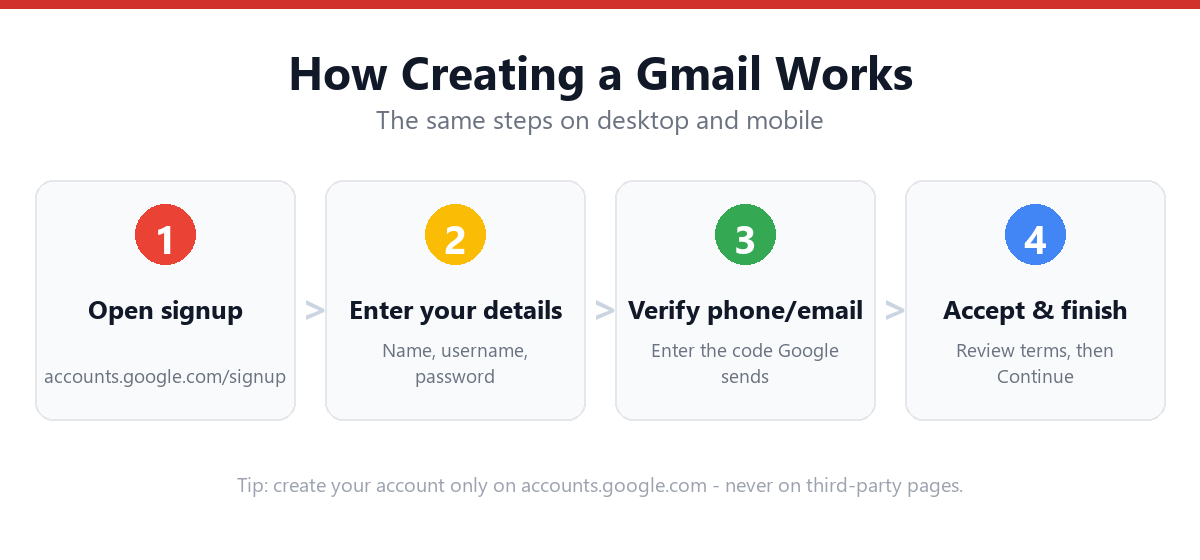
To create a Gmail account, go to accounts.google.com/signup, enter your first and last name, choose a Gmail address ending in @gmail.com, set a password, then add a phone number or recovery email and confirm your birth date. It takes about five minutes, it's free, and the same account signs you in to every Google service.
- Create your account at accounts.google.com/signup.
- Gmail only uses @gmail.com: no other domain options.
- A Gmail account is a Google account (Drive, YouTube, Photos, Play).
- Gmail ignores dots: john.smith and johnsmith are the same inbox.
- Use the username checker and password tool below before you sign up.
Free Gmail Username Format Checker
Gmail only offers @gmail.com, and with over 1.8 billion users, valid-but-available names are getting scarce. Check your idea against Google's exact rules below before you head to signup. This runs entirely in your browser. Nothing is sent anywhere, and the only thing it can't do is confirm final availability (only Google's live page can).
🔍 Check your username
Type the part before @gmail.com. We validate Google's format rules; confirm availability on the signup page.
- • Between 6 and 30 characters
- • Only letters, numbers, and periods (no _ or -)
- • Doesn't start or end with a period
- • No two periods in a row
Before You Start: What You'll Need
Gmail signup is quick, but have these ready so you don't get stuck mid-flow:
- A device with internet access
- A username idea, plus a backup or two (the pool is crowded)
- A strong password (test it with the checker below)
- Your birth date (required) and, optionally, gender
- A phone number or recovery email (optional, but strongly recommended)
Creating a Gmail address creates a Google account, a single identity that signs you in to Gmail, Google Drive (15 GB free, shared across Gmail/Drive/Photos), Google Calendar, Google Photos, YouTube, Google Play, Google Maps timeline, and dozens of other services. One signup, one login, everywhere.
How to Create a Gmail Account (Step-by-Step)
Method 1: Desktop / Web Browser
- Go to accounts.google.com/signupOr open gmail.com and click "Create account" → "For my personal use."
- Enter your first and last nameThis is your display name on emails and across Google.
- Choose your Gmail addressType a username (it ends in @gmail.com) or pick one of Google's suggestions. Google flags instantly if it's taken.
- Create and confirm a passwordAt least 8 characters; mix letters, numbers, and symbols. Re-enter to confirm.
- Click NextYou'll move to verification and recovery.
- Add a phone number (recommended)Used for recovery and 2-Step Verification. You can skip it, but recovery becomes much harder if you're locked out later.
- Add a recovery email (optional)An existing address from any provider, a useful safety net.
- Enter birth date and genderBirth date is required for age eligibility; gender is optional.
- Review and accept Google's termsSkim the Privacy and Terms, then agree.
- You're inYour new inbox opens, ready to send and receive.
Method 2: Android
- Open Settings → Accounts → Add account → GoogleOr open the Gmail app and tap "Add account."
- Tap "Create account" → "For myself"Then follow the same name/username/password steps.
- Finish verificationThe account is added to your phone automatically, signing you in to Play Store, Photos, and more.
Method 3: iPhone & iPad
- Open the Gmail app (or Safari → gmail.com)Tap "Sign in," then "Create account."
- Complete the same signup formName, address, password, recovery, birth date.
- Add it to iOS Mail (optional)Settings → Mail → Accounts → Add Account → Google.
For device-specific screenshots and tips, see: How to Create a Gmail Account on Mobile.
Free Password Strength Checker
Google requires at least 8 characters, but a bare-minimum password is the easiest way to get hacked. This tool scores your password locally (it never leaves your device) on length, character variety, and common weak patterns, so you start strong.
🔐 Test a password
Type a password idea. Don't reuse a password from another account: create a fresh one.
- • At least 12 characters (8 is Google's minimum)
- • A lowercase letter
- • An uppercase letter
- • A number
- • A symbol (! ? # $ …)
- • Not a common or obvious password
Choosing a Gmail Username (Strategies That Work)
Gmail offers only the @gmail.com domain, so you can't dodge a taken name by switching domains the way you can with Outlook. With nearly two billion users, most short or first-name-only handles are long gone. Use one of these patterns to land an address that's available and still looks professional:
| Strategy | Example | Best for |
|---|---|---|
| First + last name | johnsmith@gmail.com | Professional use |
| Add a middle initial | johnrsmith@gmail.com | Common names |
| Add a meaningful number | johnsmith.92@gmail.com | Avoid full birth year |
| Add a profession or niche | johnsmith.design@gmail.com | Freelancers, brands |
| Reverse the order | smith.john@gmail.com | When the obvious form is taken |
Avoid long strings of random numbers (spammy, hard to dictate), full birth dates (privacy risk), and anything you'll struggle to spell out loud. If Google keeps saying "that username is taken," our dedicated playbook helps: Fix "Username Not Available" During Gmail Signup.
The Gmail Dot Trick (Why john.smith = johnsmith)
This trips up almost everyone: Gmail ignores dots entirely. The addresses john.smith@gmail.com, j.o.h.n.smith@gmail.com, and johnsmith@gmail.com all deliver to the same inbox. Dots are cosmetic. Google strips them when routing mail.
Two practical consequences:
- You can't "free up" a taken name with dots. If johnsmith@gmail.com exists, john.smith@gmail.com is not available to you. It's the same address.
- It's a handy filter trick. Add dots (or a "+label", like johnsmith+shopping@gmail.com) when signing up for newsletters, then filter on that variation to sort or spot who sold your address.
Note this is a Gmail-only quirk; @googlemail.com (used in some countries) behaves the same, but other providers like Outlook treat dots as distinct characters.
Common Signup Errors & How to Fix Them
| What you see | Why it happens | Fix |
|---|---|---|
| "That username is taken" | The address (ignoring dots) already exists | Add an initial/number or rethink the name; see strategies above |
| "Use 6–30 characters" | Username too short or too long | Stay within Google's length limit (check it above) |
| "Please choose a stronger password" | Too short or too simple | 8+ characters with mixed types; test it here |
| "This phone number can't be used for verification" | Number used for too many accounts | Use a different number, or try the no-phone method |
| "Couldn't create your Google Account" | Too many signups from one IP/device | Wait 24 hours, switch networks, or use another device |
| Verification code never arrives | Wrong number, carrier delay, or VPN | Re-check the number, turn off VPN, wait a few minutes |
Gmail vs Outlook/Hotmail: Which Should You Create?
Both are free, reliable, and feature-rich. Here's an honest side-by-side to help you choose:
Choose Gmail if…
- You use Android, Google Drive, YouTube, or Google Docs
- You want best-in-class spam filtering and search
- You rely on Google Photos or Google Maps
- You like tight Chrome integration
Choose Outlook/Hotmail if…
- You use Windows, Office, or Xbox
- You want the free web Word, Excel, PowerPoint
- You'd like a choice of @outlook / @hotmail / @live / @msn
- You prefer Outlook's Focused Inbox
Plenty of people keep one of each. If you'd rather go the Microsoft route, here's our companion guide: How to Create a Hotmail/Outlook Account.
Personal vs. Google Workspace: Which Should You Create?
The signup above creates a free personal Google account with a @gmail.com address, ideal for individuals. For a business or team that wants email at a custom domain (you@yourcompany.com), Google offers Google Workspace (formerly G Suite), which adds:
- Custom-domain email instead of @gmail.com
- Admin console to manage users and security policies
- More storage and business-grade support
- Meet, Calendar, and Drive tuned for teams
It's a paid subscription rather than free. Full walkthrough: Create a Business Gmail / Google Workspace Account.
After Signup: Recommended Next Steps
- Add recovery optionsmyaccount.google.com → Security → add a recovery phone and email. This is your lifeline if you forget your password.
- Turn on 2-Step VerificationThe single biggest security win; follow our 2-Step Verification guide.
- Review privacy settingsmyaccount.google.com → Data & Privacy controls what Google stores and personalizes.
- Set up the Gmail appInstall it on your phone for mail on the go and push notifications.
- Add a profile photo and signatureHelps people recognize your mail across Google.
Need to sign back in later? Bookmark our Gmail Login guide.
What You Get With a Google Account
One free Gmail signup unlocks a surprisingly large suite, all tied to the same login:
| Service | What it gives you |
|---|---|
| Gmail | Email with powerful search and filters |
| Google Drive | 15 GB free cloud storage (shared with Gmail & Photos) |
| Google Docs/Sheets/Slides | Free online office suite |
| Google Photos | Photo backup and organization |
| YouTube | Subscriptions, history, and comments |
| Google Play | Apps, games, books on Android |
| Google Calendar, Maps, Meet | Scheduling, navigation, video calls |
Need more than 15 GB? Google One paid plans expand storage, but the free tier covers most personal use comfortably. For a full breakdown of what the free tier includes and what Google charges for, see create a free Gmail account.
Frequently Asked Questions
Is creating a Gmail account the same as creating a Google account?
Yes. When you create a Gmail account you're creating a Google account with a @gmail.com address. That single account signs you in to Drive, Calendar, Photos, YouTube, Google Play, and every other Google service.
Is a Gmail account free?
Yes, completely free, including 15 GB of storage shared across Gmail, Drive, and Photos. You only pay if you upgrade to a Google One storage plan or a Google Workspace business subscription.
Can I create a Gmail account without a phone number?
Often yes, a phone number is usually optional during signup. You can add a recovery email instead, or skip both and add them later. See our no-phone guide for the exact steps and what to do if Google insists.
Do dots matter in a Gmail address?
No : Gmail ignores dots. john.smith@gmail.com and johnsmith@gmail.com are the same inbox. This means you can't use dots to claim a name that's already taken, but you can use them (or "+labels") to filter incoming mail.
Why does Gmail keep suggesting username + numbers?
Google auto-suggests alternatives when your first choice is taken. They're only suggestions; type any available combination you prefer instead.
What are Gmail's username rules?
6 to 30 characters, using only letters, numbers, and periods (no underscores or hyphens), and it can't start or end with a period. Validate yours with the checker above.
How many Gmail accounts can I have?
Google allows multiple accounts and you can be signed in to several at once. Creating many accounts quickly with the same phone number can trigger extra verification.
What's the minimum age to create a Gmail account?
Typically 13, though some regions (notably parts of the EU) require older. Google checks the birth date you enter. Younger users can use a supervised account via Google Family Link.
Can I change my Gmail username later?
You can't rename a @gmail.com address. It's permanent. You can change your display name freely, and you can create a new account and forward old mail, but the address itself is fixed once chosen.
Sources & Official References
This guide reflects Google's current process. For account-specific actions, always use the official tools:
- Create a Google Account (accounts.google.com/signup)The official Gmail/Google account creation page.
- Google Help: Create a Google AccountOfficial step-by-step from Google Support.
- Sign in to GmailOfficial sign-in instructions.
- Turn on 2-Step VerificationOfficial guide to securing your new account.
Why You Can Trust This Guide
Iris Publishers’ editorial team produces plain-English account help guides. Every step is verified against Google's official process and updated when the interface changes. The username and password tools on this page run entirely in your browser and never transmit or store what you type.
- Independently written: not affiliated with, endorsed by, or sponsored by Google.
- Reviewed for accuracy by our editorial team before publishing and at each update.
- No credentials collected: always sign in on the provider’s official pages.
- Last reviewed: .