Hotmail Login: Complete Guide to Sign In to Outlook.com
Everything you need to log in to your Hotmail account, on desktop or mobile, plus how to fix login errors, recover a forgotten password, set up two-factor authentication, and unlock a locked account.
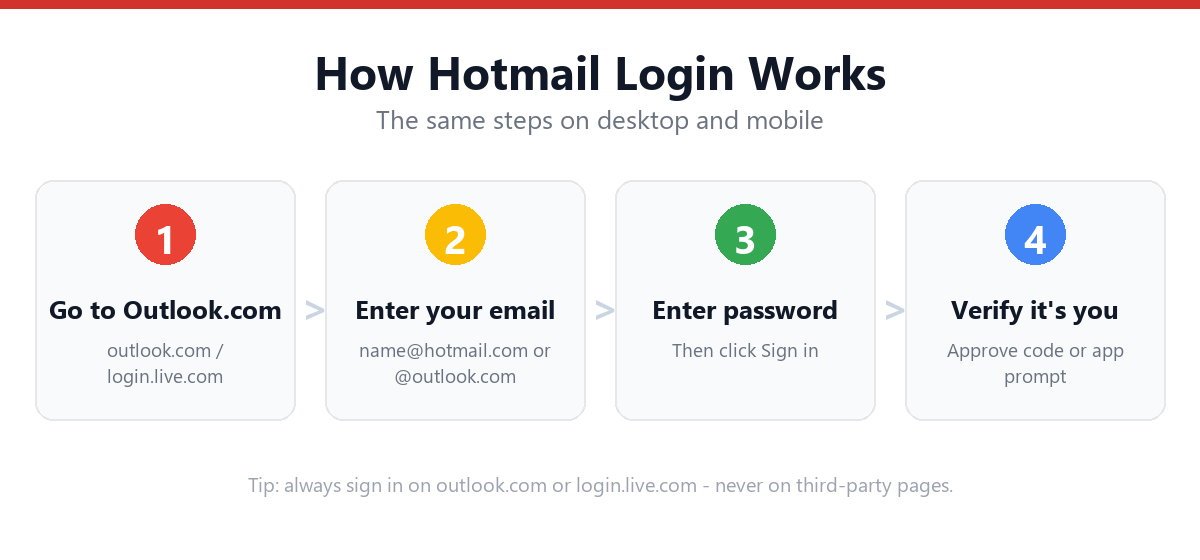
Hotmail is now part of Outlook.com. To log in, go to outlook.com or login.live.com, enter your @hotmail.com, @outlook.com, @live.com, or @msn.com email address, then enter your password. If two-factor authentication is enabled, you'll confirm a code sent to your phone or authenticator app.
- Hotmail is now Outlook.com, log in at outlook.com or login.live.com.
- Works with @hotmail.com, @outlook.com, @live.com, or @msn.com addresses.
- Two-factor authentication sends a code to your phone or authenticator.
- Use Outlook on the web, desktop app, or mobile app interchangeably.
Is My Hotmail Sign-In Page Safe? (Phishing Checker)
Fake "Hotmail login" pages are one of the most common ways accounts get stolen. Before you ever type your password, paste the web address you're about to sign in on and this tool will tell you whether it's a genuine Microsoft sign-in domain or a likely impostor. It runs entirely in your browser. Nothing is sent anywhere.
🛡️ Check a sign-in URL
Paste the full address from your browser's address bar (e.g. https://login.live.com/…).
Official Microsoft sign-in domains include outlook.com, login.live.com, account.microsoft.com, and login.microsoftonline.com. If you're ever unsure, close the page and type outlook.com into your browser yourself.
What Happened to Hotmail? (Is It Still Available in 2026?)
Microsoft retired the Hotmail brand in 2013 and migrated all accounts to Outlook.com, but existing @hotmail.com email addresses still work, and new ones can still be created. When people search for "Hotmail login," they're functionally looking for the Outlook.com sign-in page, both point to the same Microsoft account system.
Your Hotmail account is a Microsoft account. This single login also gives you access to:
- Outlook.com
- OneDrive
- Microsoft 365 / Office
- Skype
- Xbox Live
- Microsoft Teams
This is why, after logging in once, you may notice you're automatically signed into other Microsoft services on the same device.
How to Log In to Hotmail (Step-by-Step)
Desktop / Web Browser
- Go to outlook.com or login.live.comOpen your browser and navigate to either address, both lead to the same sign-in page.
- Enter your email addressType your full address, e.g. yourname@hotmail.com, @outlook.com, @live.com, or @msn.com.
- Click NextThis confirms your account exists and loads the password screen.
- Enter your passwordType your password carefully. It's case-sensitive.
- Click Sign inSubmit your credentials to proceed.
- Complete two-factor authentication (if enabled)Enter the code sent to your phone, email, or authenticator app.
- Choose whether to stay signed inSelect "Yes" on trusted personal devices, or "No" on shared/public computers.
Hotmail Login on Mobile (iPhone & Android)
You have two options:
Option 1: Outlook Mobile App (Recommended)
- Download the Outlook appGet it from the App Store (iPhone) or Google Play (Android).
- Tap Get Started or Add AccountThis opens the sign-in flow.
- Enter your Hotmail/Outlook email addressUse the same address you'd use on desktop.
- Enter your passwordThen complete 2FA if prompted.
- Allow notifications and contact syncOptional, but recommended for the full app experience.
Option 2: Mobile Browser
- Open your mobile browserSafari, Chrome, or your default browser.
- Go to outlook.comTap Sign in and enter your credentials.
- Request the desktop site (optional)For a fuller layout if the mobile view feels limited.
For a deeper walkthrough with screenshots and app-specific tips, see our dedicated guide: Hotmail Sign In on Mobile (iPhone & Android).
Hotmail Login With Email vs. Phone Number
Microsoft accounts can be set up to sign in using:
| Method | How It Works | Best For |
|---|---|---|
| Email address | Standard @hotmail.com, @outlook.com, @live.com, or @msn.com | Most users; default method |
| Phone number | If linked during setup, you can enter your phone number instead of email | Users who registered with a phone-first Microsoft account |
| Skype name | Legacy Skype usernames linked to Microsoft accounts | Long-time Skype users |
If you're unsure which identifier is linked to your account, try your most commonly used email first. If that fails, select "Forgot my email" on the sign-in page to search by phone number or recovery email.
Setting Up Two-Factor Authentication (2FA) for Hotmail
Two-factor authentication adds a second verification step beyond your password, significantly reducing the risk of unauthorized access.
How to Enable 2FA
- Sign in at account.microsoft.comUse your existing Hotmail/Outlook credentials.
- Go to Security → Advanced security optionsThis is where two-step verification lives.
- Toggle "Two-step verification" OnThis activates the extra login step.
- Choose your verification methodMicrosoft Authenticator app (recommended), SMS text, or email to an alternate address.
- Confirm your chosen methodFollow the on-screen steps to verify it works.
- Save your backup codesStore these somewhere safe. They let you in if you lose access to your primary 2FA method.
What Happens After 2FA Is Enabled
Each time you log in from a new or unrecognized device, Microsoft will ask for the second verification step after your password. Trusted devices may not be prompted every time.
Hotmail Login on Outlook Web vs. Desktop App vs. Mobile App
| Feature | Outlook Web | Desktop App | Mobile App |
|---|---|---|---|
| Access | Any browser, any device | Windows/Mac installed app | iOS/Android |
| Offline access | No | Yes | Limited |
| Best for | Quick checks, shared computers | Power users, heavy email volume | On-the-go access |
| Setup required | None; just log in | Account added via Settings | App download + login |
| Multiple accounts | Switch via account icon | Yes, side-by-side | Yes, swipeable |
If you're managing multiple Hotmail/Outlook accounts, the mobile app and desktop app both support easy account switching without fully logging out.
Troubleshooting Hotmail Login Issues
Pick what's happening below for an instant, targeted fix, or scan the full diagnostic table underneath.
🔧 Interactive login troubleshooter
What's going wrong?
| Symptom | Likely Cause | Quick Fix |
|---|---|---|
| "Your account or password is incorrect" | Wrong password, Caps Lock on, or typo in email | Reset your password |
| "Your account has been locked" | Suspicious activity detected by Microsoft | See our account locked guide |
| Stuck on a loading screen / login loop | Browser cache, cookies, or extension conflict | Clear cache, try incognito mode, disable extensions |
| Not receiving 2FA code | Phone number outdated or SMS delay | Use backup codes or Authenticator app instead |
| "This browser is not supported" | Outdated browser | Update browser or try Edge/Chrome |
| Mobile app won't sign in | Outdated app version | Update app from App Store/Play Store |
General Fixes That Solve Most Login Problems
- Clear your browser cache and cookiesEspecially if you've recently changed your password.
- Try a private/incognito windowRules out extension or cache conflicts.
- Disable browser extensionsTemporarily turn off ad blockers and password managers.
- Check Caps LockPasswords are case-sensitive.
- Confirm the correct domain@hotmail.com vs @hotmail.co.uk vs @outlook.com matter.
- Update your browser or appUse the latest available version.
- Check Microsoft's service statusVisit status.office365.com for outages.
For a complete list of fixes by exact error message, see our dedicated guide: Hotmail Login Not Working: Full Fix List.
Forgot Your Hotmail Password?
Go directly to our step-by-step recovery guide: How to Reset Your Hotmail Password (Even Without Recovery Email/Phone)
Account Locked or Disabled?
Microsoft sometimes locks accounts automatically due to:
- Unusual sign-in activity (new location, new device)
- Too many failed login attempts
- Suspected compromised credentials
- Policy violations (for disabled accounts)
If you're seeing "Your account has been locked" or similar messages, follow our dedicated walkthrough: Fix 'Your Account Has Been Locked': Hotmail/Outlook
Frequently Asked Questions
Is Hotmail the same as Outlook?
Yes. Hotmail was rebranded to Outlook.com in 2013. Existing @hotmail.com addresses still work, and the login system, inbox, and account settings are all part of Outlook.com today.
Can I still use my @hotmail.com email address?
Yes. @hotmail.com addresses are fully supported and you can still create new ones during signup, alongside @outlook.com, @live.com, and @msn.com options.
Why does Hotmail keep asking me to verify it's me?
This is Microsoft's security system detecting a sign-in from a new device, browser, or location. Completing the verification (via 2FA code, recovery email, or phone) confirms it's really you and may reduce future prompts on that device.
What's the difference between Hotmail and Microsoft account login?
There is no difference, your Hotmail/Outlook email address and password ARE your Microsoft account credentials, used across Outlook, OneDrive, Skype, Xbox, and Microsoft 365.
Can I log into Hotmail without a phone number?
Yes, if your account was set up with an email-based recovery method. However, if you've lost access to both your password and any recovery method, account recovery may require identity verification through Microsoft's recovery form.
Why am I stuck in a Hotmail login loop?
This is usually caused by browser cookies, cached login data, or a conflicting saved account. Clear your browser cache, try an incognito window, or use the "Use another account" option on the sign-in page.
How do I log into Hotmail on a shared or public computer?
Use a private/incognito browser window, and make sure to select "Sign out" (not just close the tab) when finished. Avoid checking "Stay signed in" on shared devices.
Sources & Official References
This guide reflects the provider’s current process. For account-specific actions, always use the official tools:
- Sign in to Outlook.com / HotmailOfficial Microsoft sign-in instructions.
- Create a Microsoft accountOfficial steps to create an Outlook.com / Hotmail account.
- Reset your Microsoft passwordOfficial Microsoft password reset flow.
- Microsoft account helpOfficial Microsoft account & security help.
Why You Can Trust This Guide
Iris Publishers’ editorial team produces plain-English account help guides. Every step is verified against the provider’s official process and updated when the interface changes.
- Independently written: not affiliated with, endorsed by, or sponsored by Microsoft.
- Reviewed for accuracy by our editorial team before publishing and at each update.
- No credentials collected: always sign in on the provider’s official pages.
- Last reviewed: .