How to Create a Facebook Account
Whether you're creating your first Facebook account or setting up a new one, here's the complete walkthrough for desktop and mobile — including age requirements, profile setup, and privacy basics to configure from day one.
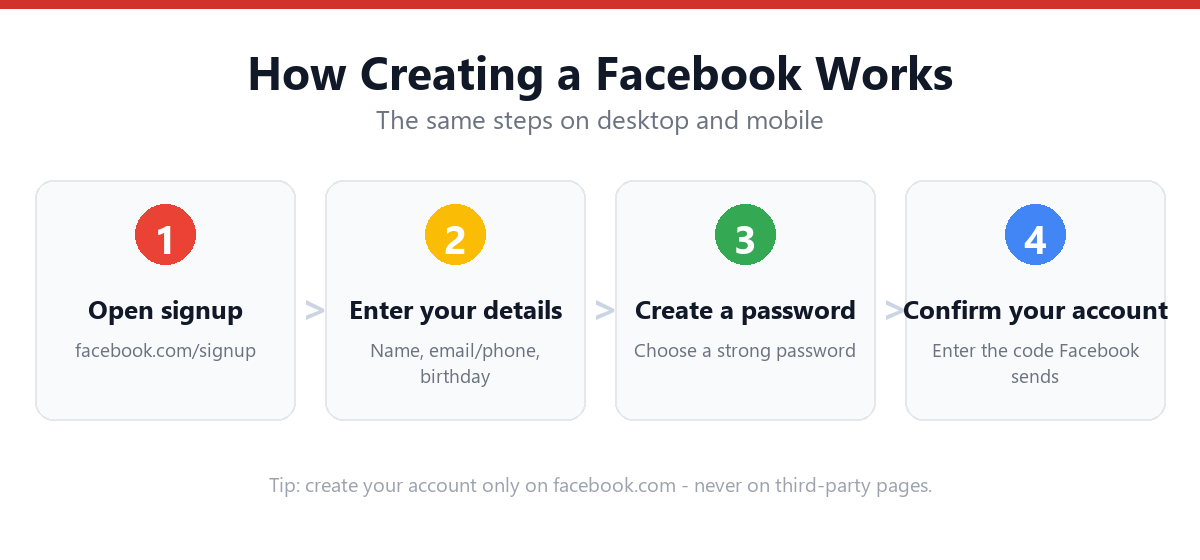
To create a Facebook account, go to facebook.com or download the Facebook app, click "Create new account," enter your name, email or phone number, password, birth date, and gender, then verify your email or phone with the code sent to you.
- Sign up at facebook.com or the app via "Create new account."
- Enter your name, email or phone, password, birth date, and gender.
- Verify with the code sent to your email or phone.
- You must be 13+, and a personal profile is required before making a Page.
Free Password Strength Checker
A strong password is your account's front door. This tool scores a password locally (it never leaves your device) on length, character variety, and common weak patterns.
🔐 Test a password
Type a new password idea — don't reuse one from another account.
- • At least 12 characters
- • A lowercase letter
- • An uppercase letter
- • A number
- • A symbol (! ? # $ …)
- • Not a common or obvious password
Facebook Age Eligibility Checker
Facebook requires you to be at least 13 (higher — often 16 — in parts of the EU). Enter your birth year to check instantly.
🎂 Check your eligibility
Before You Start: What You'll Need
- A device with internet access
- Your real name (Facebook requires this under its terms)
- An email address or phone number for signup
- A strong password
- Your birth date
Note that a Facebook account is part of your broader Meta account, which can also be used to access Messenger and, depending on settings, link with Instagram.
How to Create a Facebook Account (Step-by-Step)
Desktop / Web Browser
- Go to facebook.comOpen your browser and navigate to the homepage.
- Click "Create new account"This button is on the login page, separate from the sign-in fields.
- Enter your nameFirst and last name — Facebook's terms require using the name you go by in everyday life.
- Enter your email address or mobile numberEither works as your primary contact and login method.
- Create a passwordUse a strong, unique password.
- Enter your birth dateFacebook uses this to verify age eligibility (13+ in most regions).
- Select your genderOptions typically include Female, Male, and Custom.
- Click "Sign Up"This submits your information and creates your account.
- Verify your email or phone numberEnter the confirmation code sent to you to activate your account fully.
Creating an Account on Mobile (iPhone & Android)
- Download the Facebook appAvailable on the App Store (iPhone) or Google Play (Android).
- Open the app and tap "Create new account"This option appears on the welcome screen.
- Follow the same steps as desktopName, contact info, password, birth date, and gender.
- Verify your accountEnter the confirmation code sent via email or SMS.
For more mobile-specific tips, see: How to Create a Facebook Account on Mobile
Age Requirements for Facebook
Facebook requires users to be at least 13 years old in most countries, though this minimum age can be higher in certain regions due to local data protection laws (for example, some European countries set the age of digital consent at 16).
Facebook's systems check the birth date entered during signup against the minimum age for the relevant region. Accounts that don't meet this requirement may be restricted or removed.
For more details on age policies and what happens if an account is flagged, see: Facebook Age Requirements Explained
Setting Up Your Profile After Signup
- Add a profile photoHelps friends recognize you and is often required to unlock full account features.
- Review your privacy settingsGo to Settings & Privacy → Settings → Privacy to control who can see your posts and profile information.
- Add basic profile info (optional)Work, education, location — only add what you're comfortable sharing.
- Find friendsFacebook may suggest contacts based on your email/phone contacts, with your permission.
- Set up two-factor authenticationAdds a critical security layer to protect your new account.
Creating a Business Page vs. a Personal Account
The signup flow above creates a personal Facebook profile, which represents an individual. If you're promoting a business, brand, or organization, you'll want to create a Facebook Page instead — Pages are created from within a personal account but operate separately, with their own name, profile picture, and public-facing presence.
For setup details, see: How to Create a Facebook Business Page
Common Facebook Signup Errors & Fixes
| What you see | Why it happens | Fix |
|---|---|---|
| "This email is already registered" | You (or someone) already used that email | Use a different email, or log in / reset the password instead |
| "Please enter a valid mobile number or email" | Typo or unsupported format | Re-check the address/number; try email instead of phone (no-phone guide) |
| "You must be 13 to sign up" | Birth date below the minimum age | Check eligibility with the tool above; some regions require 16 |
| Confirmation code never arrives | Carrier delay, spam folder, or wrong contact | Wait a few minutes, check spam, or request the code again |
| "It looks like you're using a name that isn't allowed" | Facebook's real-name policy | Use your real name — no symbols, numbers, titles, or unusual capitalization |
| "We couldn't create your account" | Too many signups from one IP/device | Wait a day, switch network, or use a different device |
Frequently Asked Questions
Do I need to use my real name on Facebook?
Facebook's terms of service require users to provide the name they go by in everyday life. Accounts using clearly fake names, business names (for personal profiles), or impersonating others may be flagged or restricted.
Can I sign up for Facebook with just an email, no phone number?
Yes. During signup, Facebook asks for either an email address or a mobile number — you can choose either one and aren't required to provide both.
What happens if I enter the wrong birth date during signup?
Facebook allows users to update their birth date in account settings after signup, though repeated changes may trigger additional verification. If the birth date entered doesn't meet the minimum age requirement, the account may be restricted until the discrepancy is resolved.
Can I create multiple Facebook accounts?
Facebook's policies generally restrict users to one personal account per person. Maintaining multiple personal profiles may violate Facebook's terms, though Pages (for businesses) can be created in addition to a single personal profile.
Is creating a Facebook account free?
Yes, creating and using a personal Facebook account is free. Facebook generates revenue through advertising rather than charging users for basic access.
Sources & Official References
This guide reflects the provider’s current process. For account-specific actions, always use the official tools:
- Log in to FacebookOfficial Facebook login page.
- Create a Facebook accountOfficial Facebook account creation help.
- Recover your Facebook accountOfficial Facebook account recovery flow.
- Facebook Help CenterOfficial Facebook help and support.
Why You Can Trust This Guide
Iris Publishers’ editorial team produces plain-English account help guides. Every step is verified against the provider’s official process and updated when the interface changes.
- Independently written — not affiliated with, endorsed by, or sponsored by Meta.
- Reviewed for accuracy by our editorial team before publishing and at each update.
- No credentials collected — always sign in on the provider’s official pages.
- Last reviewed: .