Create a Free Hotmail Account: What's Actually Free (2026)
A Hotmail/Outlook.com address costs nothing: no credit card, no trial period, no expiry date. The only things Microsoft charges for are extras you never have to touch.
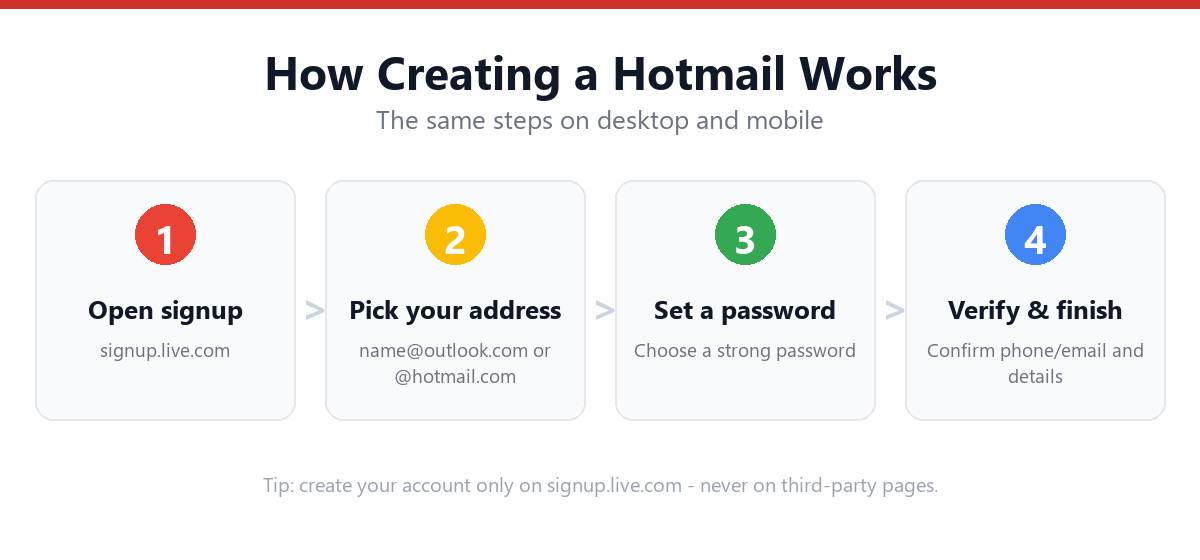
Yes. Creating a Hotmail (now Outlook.com) account is completely free and always has been. You are never asked for a payment method, there is no trial that expires, and the account does not stop working after a period of time. Go to signup.live.com, choose an address ending in @outlook.com or @hotmail.com, set a password, enter your name and birth date, and pass a short "prove you're human" check. It takes about three minutes. The free account includes 15 GB of mailbox storage, 5 GB of OneDrive cloud storage, and the free web versions of Word, Excel and PowerPoint. Microsoft only charges if you later want a Microsoft 365 subscription for more storage, desktop apps, and an ad-free inbox.
- Free means free: no card required at signup, and no expiry.
- You get 15 GB mailbox + 5 GB OneDrive + free web Office apps.
- The free inbox shows ads on the web; a paid plan removes them.
- "Free trial" prompts you may see belong to Microsoft 365, and you can skip them.
- An unused account can eventually be closed for inactivity, so sign in occasionally.
Is Hotmail Really Free, or Is There a Catch?
It's genuinely free, and it's worth being precise about why that question comes up so often. Most "free" services today mean free trial: you hand over a card, and in 30 days you start paying. Outlook.com is not that. There is no payment step in the signup flow at all, so there is nothing to cancel and nothing to forget about.
The confusion is usually caused by three things people run into:
- Microsoft 365 promotions. After signing up (or when you open Word online), Microsoft will offer you a Microsoft 365 subscription. This is an upsell for extra storage and desktop apps. Declining it changes nothing about your email account.
- Ads in the inbox. The free web version of Outlook.com displays ads. That's how the free tier is funded. They disappear if you subscribe, and they don't appear in most desktop or phone mail apps.
- The word "Hotmail" itself. Hotmail was retired as a brand and folded into Outlook.com years ago. People searching for "free Hotmail" sometimes assume the free version was discontinued along with the name. It wasn't. You can still choose a @hotmail.com address today.
What Do You Actually Get for Free?
The free tier is more generous than most people expect. Here's the whole picture, so you can decide whether you ever need to pay:
| What | Free account | Notes |
|---|---|---|
| Email address | ✓ Unlimited use | @outlook.com or @hotmail.com |
| Mailbox storage | 15 GB | Roughly 100,000+ typical emails |
| OneDrive cloud storage | 5 GB | Separate from the mailbox |
| Word, Excel, PowerPoint | ✓ Free web versions | In-browser only, not desktop apps |
| Microsoft account | ✓ Included | Signs you into Teams, Xbox, Skype, Microsoft Store |
| Calendar & contacts | ✓ Full | Syncs across devices |
| Email aliases | ✓ Up to 10 | Extra addresses into the same inbox |
| Spam & malware filtering | ✓ Included | Same filtering as paid accounts |
| Two-step verification | ✓ Included | Security is never paywalled |
| Ad-free inbox | ✗ Paid only | Ads show in the web interface |
| Desktop Office apps | ✗ Paid only | Requires Microsoft 365 |
Creating the address also creates a Microsoft account, which is the single sign-in used across Microsoft's services. That's genuinely useful even if email isn't your main goal, since it's what you'll use for a Windows PC, an Xbox, or Microsoft Teams.
Is Your Preferred Address Still Available?
The most common reason a free signup stalls is the address itself: after a billion-plus accounts, most short names are long gone. This checker validates your idea against Microsoft's formatting rules before you get to the signup page, and suggests domain variations to try. It runs entirely in your browser, and nothing is sent anywhere.
🔍 Check your username
Type the part that goes before the @ sign. We check Microsoft's format rules; only the live signup page can confirm final availability.
- • Between 1 and 64 characters
- • Starts with a letter
- • Only letters, numbers, and . _ -
- • Doesn't start or end with a period
- • No two periods in a row
If your first choice is taken, our full playbook covers what actually works: Fix "Username Unavailable" During Signup.
How to Create a Free Hotmail Account (Step-by-Step)
Three routes, all free, all producing the same account. Pick whichever suits the device in front of you. For a screen-by-screen equivalent on the Google side, see the Gmail signup walkthrough.
Method 1: Desktop or laptop browser
- Go to signup.live.comYou can also start at outlook.com and click "Create free account". Both lead to the same form. Note the wording: Microsoft itself calls it a free account.
- Type your desired addressEnter the part before the @, then use the drop-down to pick your domain. @outlook.com and @hotmail.com are offered in most regions.
- Create a passwordMinimum 8 characters using at least two of: uppercase, lowercase, numbers, symbols. Untick the promotional-email box here if you'd rather not receive marketing.
- Enter your first and last nameThis is the display name recipients see on your emails. It can be changed later.
- Enter your country/region and date of birthUsed to apply the correct age and privacy settings for your location.
- Complete the human-verification puzzleUsually rotating an image or a short visual puzzle. No payment details are requested at any point in this flow.
- Your inbox opensYou're taken straight into Outlook.com, ready to send and receive. The account is live immediately.
Method 2: The Outlook mobile app (iPhone & Android)
- Install OutlookFree on the App Store or Google Play.
- Open it and tap "Create new account"On the welcome screen, choose to create rather than sign in.
- Pick your free address and set a passwordSame domain choices as desktop.
- Add your name and date of birth, then verifyThe app loads your inbox and offers to turn on notifications.
For device-specific screenshots, see How to Create a Hotmail Account on Mobile.
Method 3: Mobile browser, no app needed
You don't have to install anything. Open your phone's browser, go to signup.live.com, and complete the identical form. This is the route to use on a shared, work, or school phone where you can't install apps. You can always add the account to the built-in Mail app afterwards.
Set a Strong Password (Free Accounts Get Targeted More)
Microsoft asks for 8 characters and two character types, but "meets the minimum" and "actually secure" are very different things, and free webmail addresses are a standard target for credential-stuffing attacks. This checker scores your idea locally against length, variety, and common weak patterns. It never leaves your device.
🔐 Test a password
Type a password idea to see its strength. Don't paste a password you already use elsewhere. Make up a new one for this account.
- • At least 12 characters (8 is Microsoft's minimum)
- • A lowercase letter
- • An uppercase letter
- • A number
- • A symbol (! ? # $ …)
- • Not a common or obvious password
Free Account vs Microsoft 365: Do You Ever Need to Pay?
For most people the honest answer is no. Here's a straight comparison so you can judge it yourself rather than from an upgrade prompt:
Free Outlook.com
- 15 GB mailbox, 5 GB OneDrive
- Word/Excel/PowerPoint on the web
- Full spam filtering and 2-step verification
- Ads shown in the web inbox
- Best for: personal email, backups, signups, students
Microsoft 365 (paid)
- Much larger mailbox and 1 TB OneDrive on the main plans
- Installable desktop Office apps
- Ad-free inbox
- Advanced security tools and custom-domain options
- Best for: heavy document work, businesses, families sharing storage
Plan names and prices change, so check Microsoft's own pricing page before subscribing to anything. The key point for this guide: none of it is required. A free account created today works indefinitely without a subscription. Weighing it against the other big free provider? See how free Gmail compares, including the storage difference that catches most people out.
What Goes Wrong During a Free Signup?
| What you see | Why | Fix |
|---|---|---|
| "This email address is already taken" | Someone has the address on any Microsoft domain | Add an initial or a meaningful number, or switch domain; see the full fix guide |
| Asked for a phone number | Standard recovery prompt, often risk-based | Look for the alternate-email option; phone-free walkthrough |
| Stuck on the puzzle/CAPTCHA | VPN, shared IP, or unusual browser signals | Turn off the VPN, try a different browser, or switch network |
| "Something went wrong" loop | Cached session data | Clear cookies for live.com, or use a private window |
| Prompted to start a trial | Microsoft 365 upsell, not the email signup | Skip or decline; the free account is already created |
| Too many accounts from one device | Rate limiting on new-account creation | Wait 24 hours, or create it from a different network |
What Should You Do Straight After Signing Up?
- Add a recovery methodAn alternate email or phone number. Without one, a forgotten password can mean permanent loss of the account.
- Turn on two-step verificationIt's free on this tier, and it's the single highest-value security setting. See our Hotmail sign-in guide for where the security settings live.
- Sign in occasionally if it's a backup addressThis is what keeps the inactivity policy from ever applying to you.
Frequently Asked Questions
Is a Hotmail account free forever, or only for a trial period?
Free indefinitely. There is no trial period and no payment method collected during signup, so there is nothing that can expire or start charging you. The only way to end up paying Microsoft is to actively subscribe to Microsoft 365 later.
Can I still get a @hotmail.com address, or only @outlook.com?
Both are usually available. The Hotmail brand was retired and the service became Outlook.com, but @hotmail.com remains selectable in the domain drop-down during signup in most regions. Functionally the two are identical: same inbox, same storage, same features.
How much storage does a free Hotmail account get?
15 GB of mailbox storage, plus a separate 5 GB of OneDrive cloud storage. For typical personal email that's many years of messages. Large attachments are what fill it up, so if you approach the limit, deleting old mail with big attachments recovers the most space fastest.
Do I need a credit card to create a free Hotmail account?
No. No payment details are requested at any point in the account-creation flow. If you're being asked for a card, you're on a Microsoft 365 subscription page rather than the email signup, so go back to signup.live.com.
Why does my free inbox show ads?
Advertising is how Microsoft funds the free tier. Ads appear in the Outlook.com web interface. They're generally not shown when you access the same account through a desktop mail client or the mobile app, and a Microsoft 365 subscription removes them entirely.
How many free Hotmail accounts can I create?
There's no single published limit, but Microsoft rate-limits how many new accounts can be created from one device or network in a short window. If you hit that, you'll see a generic error. Waiting a day or creating the account from a different network resolves it. Rather than multiple accounts, consider aliases: a free account supports up to 10 extra addresses feeding one inbox.
Will my free account be deleted if I don't use it?
It can be. Microsoft's terms permit closing accounts that stay completely inactive for an extended period; two years is the commonly cited threshold. Signing in occasionally is enough to keep it active, which matters most if you created the address purely as a recovery or backup mailbox.
Is a free Hotmail account secure enough for important email?
The security features are not paywalled: free accounts get the same spam and malware filtering and the same two-step verification as paid ones. Your actual risk depends on using a strong, unique password and enabling two-step verification, not on whether you pay.
Sources & Official References
This guide reflects Microsoft's current process. For account-specific actions, always use the official tools:
- Create a Microsoft accountOfficial Microsoft account signup page.
- Outlook.comOfficial Outlook.com sign-in and inbox.
- Microsoft Outlook SupportOfficial Outlook help and documentation.
- Microsoft Account DashboardManage security, aliases, and subscriptions.
Why You Can Trust This Guide
Iris Publishers' editorial team produces plain-English account help guides. Every step is verified against the provider's official process and updated when the interface changes.
- Independently written: not affiliated with, endorsed by, or sponsored by Microsoft.
- Reviewed for accuracy by our editorial team before publishing and at each update.
- No credentials collected. Always sign in on the provider's official pages.
- Pricing and plan names change, so check Microsoft's own pricing page before subscribing to anything.
- Last reviewed: .