"Username Not Available": Gmail Signup Fix
Gmail only offers the @gmail.com domain — which means with over 1.8 billion active users, nearly every common name combination is already taken. Here's how to find something that actually works.
"That username is taken" means someone already has that exact @gmail.com address. Unlike Outlook, Gmail has no alternative domain endings — your only options are to modify the username itself. Adding numbers, a middle name or initial, or a meaningful word are the most reliable strategies.
- "Username taken" means that exact @gmail.com address already exists.
- Gmail has only one domain, so you must change the username itself.
- Add numbers, a middle name or initial, or a meaningful word.
- The dots "trick" won't free a taken name — it's the same inbox.
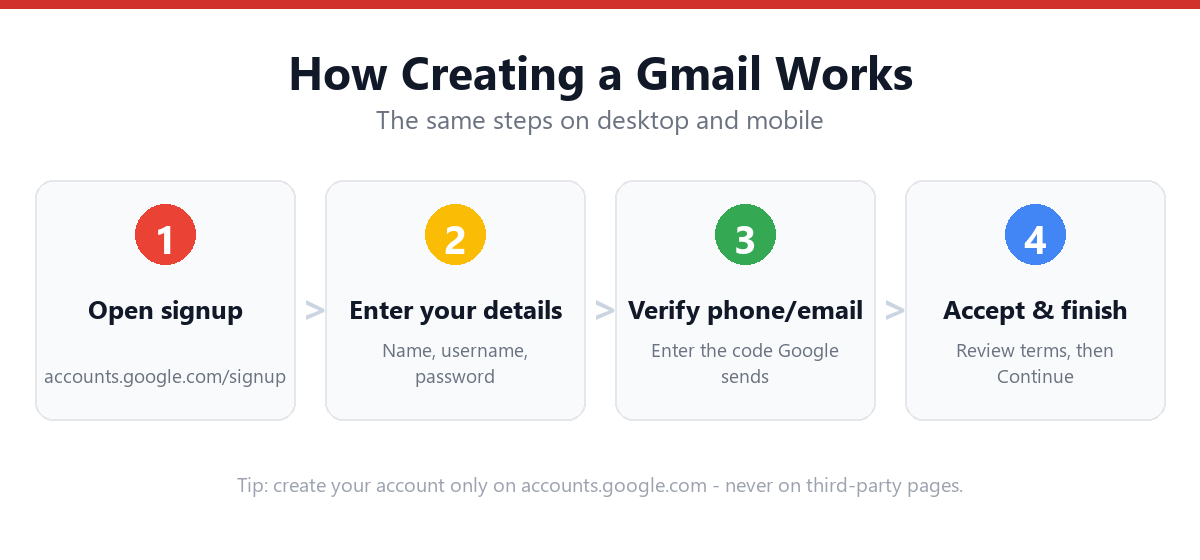
Why Gmail Usernames Are So Hard to Get
Gmail launched in 2004 and has grown to over 1.8 billion active users. Unlike Microsoft's Outlook/Hotmail system — which offers @outlook.com, @hotmail.com, @live.com, and @msn.com — Gmail has exactly one domain: @gmail.com. This means:
- Every common first + last name combination at any reasonable length is taken
- Most short usernames (under 6-7 characters) are gone
- Even many uncommon name combinations have been claimed
- Unlike deleted Outlook accounts, Google holds deleted Gmail usernames permanently — they are never released for reuse
What Won't Work: The Dot Myth
A common misconception is that adding dots creates a new unique address. Gmail ignores dots in usernames entirely — john.smith@gmail.com, j.o.h.n.s.m.i.t.h@gmail.com, and johnsmith@gmail.com all deliver to the exact same inbox (if that address exists). Dots cannot be used to create a variation of a taken username.
Strategies That Actually Work
1. Add Meaningful Numbers
| Instead of | Try | Why It Works |
|---|---|---|
| johnsmith@gmail.com | johnsmith1991@gmail.com | Birth year is memorable and personal |
| johnsmith@gmail.com | johnsmith2024@gmail.com | Year you're creating the account |
| johnsmith@gmail.com | johnsmith24@gmail.com | Shorter number, still meaningful |
Avoid random strings like johnsmith8473921 — hard to remember and unprofessional.
2. Include a Middle Name or Initial
- johnrsmith@gmail.com (middle initial)
- johnrobertsmith@gmail.com (full middle name)
- jrsmith@gmail.com (first initial + middle + last)
3. Add a Profession, Hobby, or Location
| Category | Example |
|---|---|
| Profession | johnsmithdentist@gmail.com |
| Hobby | johnsmithphotography@gmail.com |
| City/region | johnsmithnyc@gmail.com |
4. Restructure the Name
- smithjohn@gmail.com (last name first)
- smith.john.official@gmail.com
- js.contact@gmail.com (initials only)
5. Use Google's Suggestions
When your username is taken, Google shows 3-4 suggested alternatives below the field. These are algorithmically generated based on your name and are always available — they can be a reasonable starting point even if they need slight modification.
Frequently Asked Questions
Can I get a deleted Gmail address?
No. Google permanently retires deleted Gmail usernames and does not release them for reuse, unlike some other email providers. If a username shows as unavailable, it will remain that way regardless of the original account's status.
Does adding a dot to a Gmail username make it available?
No — Gmail ignores dots in usernames entirely, treating john.smith@gmail.com and johnsmith@gmail.com as the same address. Adding dots cannot create a new unique username from a taken one.
Is there any alternative to @gmail.com for a Google account?
For a free personal account, @gmail.com is the only option. For business use, Google Workspace allows you to use a custom domain (e.g., you@yourcompany.com) — see our Google Workspace guide for details.
Can I change my Gmail username after creating the account?
Gmail does not allow changing the primary @gmail.com username after the account is created. You can add a Google account alias (via myaccount.google.com → Personal info → Email) which provides an alternative address, but the original @gmail.com address remains tied to the account.
Sources & Official References
This guide reflects the provider’s current process. For account-specific actions, always use the official tools:
- Google Help: Sign in to GmailOfficial Gmail sign-in instructions from Google.
- Create a Google AccountOfficial steps to create a new Google/Gmail account.
- Turn on 2-Step VerificationOfficial 2-Step Verification setup guide.
- Google Account RecoveryOfficial recovery flow for locked or forgotten accounts.
Why You Can Trust This Guide
Iris Publishers’ editorial team produces plain-English account help guides. Every step is verified against the provider’s official process and updated when the interface changes.
- Independently written — not affiliated with, endorsed by, or sponsored by Google.
- Reviewed for accuracy by our editorial team before publishing and at each update.
- No credentials collected — always sign in on the provider’s official pages.
- Last reviewed: .