How to Create a Hotmail/Outlook Account
Whether you want a new @hotmail.com address or an @outlook.com account, the signup is the same five-minute process. Here's the complete walkthrough for desktop and mobile, plus a live username checker, a password strength tool, and fixes for every common signup error.
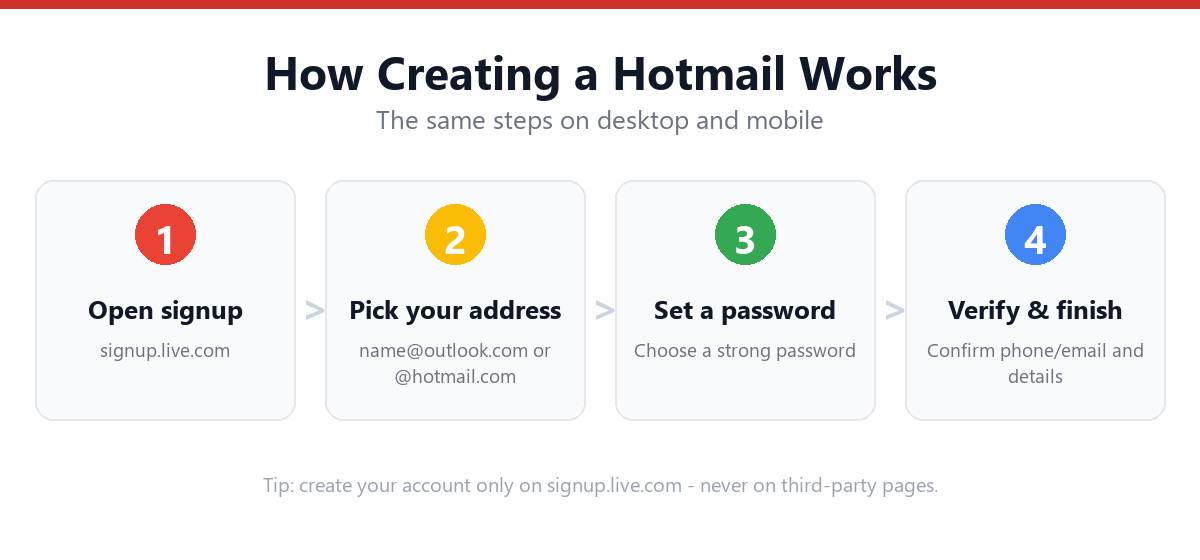
To create a Hotmail/Outlook account, go to outlook.com or signup.live.com, click "Create free account," choose your email address ending in @hotmail.com, @outlook.com, @live.com, or @msn.com, set a password, then enter your name, birth date, and a verification (phone or alternate email). The whole process takes about five minutes and the account is free forever.
- Create one at outlook.com or signup.live.com via "Create free account."
- You can still pick @hotmail.com, @outlook.com, @live.com, or @msn.com, all identical.
- A Hotmail account is also a Microsoft account (OneDrive, Office web, Skype, Xbox).
- No phone number is strictly required, an alternate email works for recovery.
- Use the username checker and password tool below before you sign up.
Free Hotmail Username Format Checker
Before you head to the signup page, check whether your desired username is valid under Microsoft's rules. This tool runs entirely in your browser. Nothing is sent anywhere, and tells you instantly if your username breaks a formatting rule, then suggests domains and variations to try.
🔍 Check your username
Type the part that goes before the @ sign. We check Microsoft's format rules; only the live signup page can confirm final availability.
- • Between 1 and 64 characters
- • Starts with a letter
- • Only letters, numbers, and . _ -
- • Doesn't start or end with a period
- • No two periods in a row
Before You Start: What You'll Need
Creating an Outlook.com account is quick, but having these ready avoids interruptions partway through:
- A device with internet access (computer, phone, or tablet)
- A username idea, and a couple of backups in case your first choice is taken
- A strong password (use the checker below)
- Your birth date (used for age-appropriate settings and eligibility)
- A phone number or an alternate email address for account recovery (recommended, not mandatory)
Creating a Hotmail/Outlook address also creates a Microsoft account, which unlocks the same sign-in across OneDrive (5 GB free cloud storage), the free web versions of Word, Excel, and PowerPoint, Skype, Microsoft Teams (free), and Xbox services. In other words, one signup gives you an email inbox and a full Microsoft identity.
How to Create a Hotmail/Outlook Account (Step-by-Step)
Method 1: Desktop / Web Browser
- Go to outlook.com or signup.live.comOpen any browser (Chrome, Edge, Safari, Firefox) and navigate to either address. Both lead to the same signup flow.
- Click "Create free account"On outlook.com this button sits beneath the "Sign in" option. signup.live.com takes you straight to the form.
- Choose your email addressType your desired username, then use the drop-down to pick a domain: @outlook.com, @hotmail.com, @live.com, or @msn.com. If your choice is taken, Microsoft suggests alternatives instantly.
- Create a passwordAt least 8 characters using two of: uppercase, lowercase, numbers, symbols. You can untick "Send me promotional emails" here if you prefer.
- Enter your first and last nameThis is the display name recipients will see on your emails.
- Enter your country/region and birth dateMicrosoft uses this to apply the correct age and privacy settings for your location.
- Solve the verification puzzleA "prove you're human" challenge, usually rotating an image or a short puzzle, not a password.
- Your inbox opensYou're dropped straight into your new Outlook.com inbox, ready to send and receive mail.
Method 2: Mobile (iPhone & Android)
- Download the Outlook appFree on the App Store (iPhone/iPad) or Google Play (Android).
- Open it and tap "Create new account"On the welcome screen, choose to create rather than sign in.
- Pick your address and domainSame choice of @outlook.com / @hotmail.com / @live.com / @msn.com.
- Set a password, name, and birth dateIdentical fields to desktop.
- Complete the human-verification check and finishThe app then loads your inbox and offers to enable notifications.
For device-specific tips and screenshots, see: How to Create a Hotmail Account on Mobile.
Method 3: Mobile Browser (no app)
You don't have to install anything. Open your phone's browser, go to signup.live.com, and complete the same form. This is handy on shared or work phones where you can't install apps. Once created, you can add the account to the built-in Mail app later.
Free Password Strength Checker
Microsoft requires at least 8 characters and two character types, but "meets the minimum" and "actually secure" are very different things. This checker scores your password locally (it never leaves your device) against length, character variety, and common weak patterns, so you create something strong from day one.
🔐 Test a password
Type a password idea to see its strength. Don't paste a password you already use elsewhere: make up a new one for your account.
- • At least 12 characters (8 is Microsoft's minimum)
- • A lowercase letter
- • An uppercase letter
- • A number
- • A symbol (! ? # $ …)
- • Not a common or obvious password
Choosing Your Email Address (Strategies That Work)
With well over a billion existing Outlook/Hotmail addresses, common usernames, especially short or first-name-only ones, are almost always taken. Rather than fighting for "john@outlook.com," use one of these proven patterns to find an address that's available and still looks professional:
| Strategy | Example | Best for |
|---|---|---|
| First + last name | john.smith@outlook.com | Professional use |
| Add a middle initial | john.r.smith@outlook.com | Common names |
| Add a meaningful number | johnsmith.92@outlook.com | Avoid birth year for privacy |
| Switch the domain | johnsmith@live.com | When @outlook is taken |
| Add a role or interest | johnsmith.design@outlook.com | Freelancers, side projects |
| Initials + surname | jrsmith@outlook.com | Short, clean look |
Avoid sequential numbers like "johnsmith12345" (looks spammy and is easy to mistype), full birth dates (a privacy and security risk), and hard-to-spell combinations you'll have to dictate over the phone. If you keep hitting "this username is unavailable," our dedicated guide has a full playbook: Fix "Username Unavailable" During Signup.
@outlook.com vs @hotmail.com vs @live.com vs @msn.com: Does It Matter?
Functionally, no: all four endings use the exact same inbox, the same Microsoft account system, the same 15 GB of mailbox storage, the same apps, and the same security. The only real differences are perception and availability:
| Domain | Impression it gives | Availability of common names |
|---|---|---|
| @outlook.com | Modern, default for new signups | Most short names already taken |
| @hotmail.com | Classic, instantly recognizable | Heavily saturated; short names rare |
| @live.com | Neutral, less common | Better odds for common names |
| @msn.com | Retro, rarely chosen now | Often the best odds of all four |
So if "johnsmith@outlook.com" and "@hotmail.com" are both gone, try @live.com or @msn.com: the address works identically, sends and receives the same, and nobody will treat it differently. You generally cannot change the domain part later without creating a new address, so pick one you're happy to keep, but don't overthink it.
Common Signup Errors & How to Fix Them
Most failed signups come down to a handful of issues. Here's the quick diagnostic table:
| What you see | Why it happens | Fix |
|---|---|---|
| "This username is already taken" | Someone has that exact address | Add a number/initial or switch to @live.com / @msn.com |
| "Enter a valid email address" | Illegal characters or wrong format | Use only letters, numbers, . _ - and start with a letter (check it above) |
| "Choose a stronger password" | Too short or too simple | 8+ chars with at least two character types; test it here |
| Stuck on the puzzle / CAPTCHA loop | Browser extensions, VPN, or cookies | Disable ad blockers, turn off VPN, or try an incognito window |
| "We can't create your account right now" | Too many accounts from one IP/device | Wait 24 hours, switch network, or use a different device |
| Verification code never arrives | Wrong number, carrier delay, or full inbox | Re-check the number, wait 5 minutes, or use the email option |
| "You've reached the limit for creating accounts" | Microsoft's anti-abuse limit per phone/IP | Use a different recovery contact, or try again the next day |
Hotmail/Outlook vs Gmail: Which Should You Create?
If you're starting fresh and deciding between an Outlook.com address and a Gmail address, both are free, reliable, and packed with features. Here's an honest side-by-side:
Choose Hotmail/Outlook if…
- You use Windows, Office, or Xbox and want one login for everything
- You want the free web versions of Word, Excel, and PowerPoint
- You like Outlook's "Focused Inbox" and built-in calendar
- You want a classic @hotmail.com address
Choose Gmail if…
- You use Android, Google Drive, YouTube, or Google Docs
- You want best-in-class spam filtering and search
- You rely on Google Photos or Google Workspace
- You want tight integration with Chrome
There's no wrong answer. Many people keep one of each (work and personal). If you'd rather go the Google route, here's our companion guide: How to Create a Gmail Account.
Personal vs. Business Account: Which Should You Create?
The signup flow above creates a personal Microsoft account: perfect for individual email, OneDrive, and the free Office web apps. If you're setting up email for a company or team, consider Microsoft 365 (Outlook for business) instead, which adds:
- A custom domain: yourname@yourcompany.com instead of @outlook.com
- Admin controls: add/remove team members, set policies
- Larger mailboxes and OneDrive storage
- Desktop Office apps on paid plans
It's a paid subscription rather than a free account. Full walkthrough here: How to Create a Business Outlook / Microsoft 365 Account.
After Signup: Recommended Next Steps
Your inbox works the moment it's created, but spend five more minutes locking it down and setting it up properly:
- Add recovery infoGo to account.microsoft.com → Security → add a recovery phone and an alternate email. This is what saves you if you ever forget your password.
- Turn on two-step verificationSame Security page → "Two-step verification." It's the single biggest thing you can do to keep your account safe.
- Set up the Outlook appAdd the account to the Outlook app on your phone so you get mail on the go.
- Import old email and contacts (optional)Settings → "Sync email" lets you pull in mail and contacts from Gmail or another provider.
- Personalize your inboxAdd a signature, a profile photo, and organize folders or rules so important mail stands out.
Already done and just need to sign back in later? Bookmark our Hotmail Login guide.
Security Tips for Your New Account
An email account is the master key to everything else: password resets for your bank, social media, and shopping accounts all land in your inbox. Protect it like one:
- Use a unique password you don't use anywhere else (the tool above helps you build one).
- Enable two-step verification so a stolen password alone isn't enough to get in.
- Add the Microsoft Authenticator app for passwordless or app-based sign-in.
- Keep recovery info current: an old phone number you've lost access to is worse than none.
- Never enter your password on a page you reached from an email link. Always type outlook.com yourself.
- Review recent activity occasionally at account.microsoft.com → Security → "Sign-in activity" to spot anything unfamiliar.
If you ever get locked out despite this, our Hotmail Account Locked and Forgot Hotmail Password guides walk you through recovery.
What Happened to Hotmail? (A Quick History)
Hotmail was one of the world's first free webmail services, launched in 1996 and bought by Microsoft in 1997. For over a decade it was synonymous with email itself. In 2013, Microsoft retired the Hotmail brand and migrated everyone to Outlook.com: but crucially, nothing was lost. Existing @hotmail.com addresses kept working exactly as before, and Microsoft continued letting new users pick @hotmail.com at signup.
So in 2026, "Hotmail" and "Outlook.com" are two names for the same service. When you create a "Hotmail account" today, you're really creating a modern Outlook.com mailbox that happens to use the @hotmail.com ending. Everything, the interface, the apps, the security, the storage, is identical to a brand-new @outlook.com account. This is why you'll see the two terms used interchangeably throughout this guide.
What's Included: Storage & Limits
A free Outlook.com/Hotmail account is genuinely generous. Here's exactly what you get at no cost:
| Feature | Free account |
|---|---|
| Mailbox storage | 15 GB |
| OneDrive cloud storage | 5 GB |
| Attachment size limit | Up to 33 MB (larger files go via OneDrive links) |
| Office web apps | Word, Excel, PowerPoint, OneNote (browser versions) |
| Other Microsoft services | Skype, Teams (free), Xbox, Microsoft Rewards |
| Cost | Free forever (ad-supported inbox) |
If you need more, an ad-free inbox, 1 TB of OneDrive, and the full desktop Office apps. That's the paid Microsoft 365 upgrade, but the free tier is plenty for everyday personal email. For a full breakdown of what costs nothing and what does not, see create a free Hotmail account.
Using Hotmail in an Email App (IMAP, POP & SMTP Settings)
Want your new address in Apple Mail, Thunderbird, the desktop Outlook app, or your phone's built-in mail client? Most apps set it up automatically when you enter your address and password. If you need to configure it manually, use these official server settings:
| Setting | Incoming (IMAP) | Outgoing (SMTP) |
|---|---|---|
| Server | outlook.office365.com | smtp.office365.com |
| Port | 993 | 587 |
| Encryption | SSL/TLS | STARTTLS |
| Username | your full email address | your full email address |
IMAP (recommended) keeps your mail synced across every device; POP downloads mail to one device and is best avoided unless you have a specific reason. If two-step verification is enabled and your app doesn't support modern sign-in, you may need to create an app password at account.microsoft.com → Security.
Managing Multiple Addresses with Aliases
One underused feature: a single Microsoft account can have several email addresses (called aliases) that all land in the same inbox. This lets you, for example, keep a clean @outlook.com address for work and a casual @hotmail.com alias for sign-ups, without juggling two logins.
To add one, go to account.microsoft.com → Your info → Manage how you sign in to Microsoft, then "Add email." You can send from any alias, receive on all of them, and even change which alias is primary. You're limited to a certain number of aliases per year, so add them deliberately. This is also the cleanest way to "get" a @hotmail.com address if you originally signed up with @outlook.com.
Frequently Asked Questions
Is Hotmail still available for new accounts in 2026?
Yes. The "Hotmail" brand was folded into Outlook.com back in 2013, but you can still create brand-new addresses ending in @hotmail.com today, right alongside @outlook.com, @live.com, and @msn.com, all run on the same modern Outlook system.
Is creating a Hotmail/Outlook account really free?
Yes, completely free with no time limit. The free account includes 15 GB of mailbox storage, 5 GB of OneDrive, and the free web versions of Word, Excel, and PowerPoint. You only pay if you upgrade to a Microsoft 365 subscription for extra storage or the desktop Office apps.
Can I create a Hotmail account without a phone number?
Yes. A phone number is recommended for recovery but not mandatory during signup. You can use an alternate email instead, or add a phone later. See our no-phone signup guide for the exact steps.
What's the difference between @hotmail.com and @outlook.com?
None functionally. both are part of the same Outlook.com system with identical features, storage, and interface. The only difference is the text after the @ symbol. Pick whichever you prefer or whichever has your name available.
Why does it keep saying my username is taken?
Popular names were claimed years ago. Add a middle initial or number, or switch the domain to @live.com or @msn.com, which have far more availability. Our username fix guide covers every workaround.
What are Microsoft's username rules?
Your username must start with a letter and can contain only letters, numbers, periods (.), hyphens (-), and underscores (_). It can't start or end with a period or contain two periods in a row. Use the checker above to validate yours instantly.
Do I need to verify my identity to create an account?
Basic signup only needs a CAPTCHA-style "prove you're human" check, your name, and birth date. Deeper identity verification (like an ID upload) is generally only requested later if your account is flagged for unusual activity.
Can I create multiple Hotmail accounts?
Yes, Microsoft allows multiple personal accounts. Each ideally needs its own recovery contact, and reusing one phone number across many accounts can trigger Microsoft's anti-abuse limits, so space them out and vary the recovery email.
What's the minimum age to create a Microsoft account?
You must meet the "age of digital consent" in your country, typically 13–16 depending on local law. Younger users can have an account created and supervised by a parent through Microsoft Family Safety.
Can I switch my @outlook.com address to @hotmail.com later?
You can add an alias (an extra address that lands in the same inbox) at account.microsoft.com → Your info → "Manage how you sign in," and even make it your primary. You can't rename the local part freely, but aliases give you flexibility without creating a whole new account.
Sources & Official References
This guide reflects Microsoft's current process. For account-specific actions, always use the official tools:
- Create a Microsoft account (signup.live.com)The official Hotmail/Outlook account creation page.
- How to create a new Microsoft accountOfficial step-by-step from Microsoft Support.
- Sign in to Outlook.comOfficial sign-in instructions.
- Microsoft account security & 2-step verificationManage recovery info and turn on two-step verification.
Why You Can Trust This Guide
Iris Publishers’ editorial team produces plain-English account help guides. Every step is verified against Microsoft's official process and updated when the interface changes. The username and password tools on this page run entirely in your browser and never transmit or store what you type.
- Independently written: not affiliated with, endorsed by, or sponsored by Microsoft.
- Reviewed for accuracy by our editorial team before publishing and at each update.
- No credentials collected: always sign in on the provider’s official pages.
- Last reviewed: .