Hotmail Login Not Working: 9 Fixes by Exact Error Message
If Hotmail or Outlook.com won't let you sign in, the fastest path forward is matching your exact error message to the right fix below — most login issues fall into one of these nine categories.
Most "Hotmail login not working" issues are caused by an incorrect password, a browser cache/cookie conflict, an outdated app, or a temporary Microsoft account lock. Clear your browser cache, try an incognito window, and confirm you're using the right email domain (@hotmail.com vs @outlook.com vs @live.com) before attempting a password reset.
- Common causes: wrong password, cache conflict, outdated app, or a Microsoft lock.
- Clear your cache, try incognito, and confirm your exact email domain.
- Match your specific error message to its fix.
- Reset your password when standard fixes don't work.
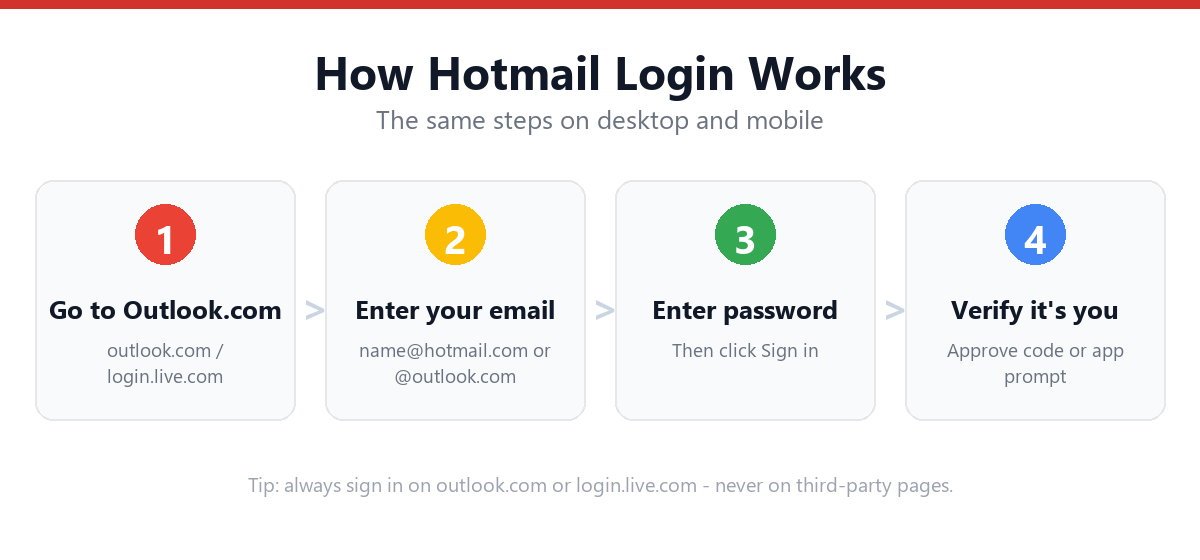
Find Your Error Message
| Error Message / Symptom | What It Means | Fix |
|---|---|---|
| "Your account or password is incorrect" | Wrong password, Caps Lock on, or typo in your email address | Double-check Caps Lock, retype your email carefully, or reset your password |
| "Your account has been locked" | Microsoft detected unusual activity and paused sign-in | Follow our account locked guide |
| Page keeps reloading / login loop | Conflicting cached login session or cookie | Clear cookies, use incognito, or click "Use another account" |
| "We couldn't sign you in" (generic) | Temporary server-side issue or browser incompatibility | Try a different browser, check status.office365.com |
| 2FA code never arrives | SMS delay or outdated phone number on file | Use Microsoft Authenticator app or a backup code instead |
| "This browser is not supported" | Browser version too old for Outlook.com | Update your browser, or switch to Edge/Chrome/Firefox |
| Sign-in works on browser but not the app | App cache or outdated app version | Update the Outlook app, then sign out and back in |
| "Too many incorrect attempts" | Account temporarily throttled for security | Wait 30-60 minutes before trying again, or reset password |
| Blank/white screen after entering password | JavaScript blocked or extension conflict | Disable ad blockers and privacy extensions, then retry |
Step-by-Step: The 7 Fixes That Solve Most Issues
- Clear your browser cache and cookiesGo to your browser's settings, clear cached images/files and cookies for the last 24 hours, then reload outlook.com.
- Try an incognito or private windowThis bypasses cached sessions and most extension conflicts entirely.
- Click "Use another account"On the sign-in page, this clears any stuck or conflicting saved account.
- Disable browser extensions temporarilyAd blockers, privacy tools, and some password managers can interfere with Microsoft's login scripts.
- Double-check your email domain@hotmail.com, @outlook.com, @live.com, and @msn.com are different addresses — make sure you're using the right one.
- Update your browser or the Outlook appOutdated software is a common, overlooked cause of login failures.
- Check Microsoft's service statusVisit status.office365.com — if Microsoft is having an outage, no fix on your end will help until it's resolved.
When You Should Reset Your Password Instead
If you've tried the steps above and you're still seeing "incorrect password" specifically (not a lock or loop), it's time to reset rather than keep guessing. Repeated failed attempts can escalate a temporary issue into a full account lock.
Frequently Asked Questions
Why can't I log into Hotmail even with the correct password?
This is usually caused by a browser cache/cookie issue, an outdated app version, or a temporary Microsoft-side outage. Try clearing your cache, using incognito mode, and checking status.office365.com before assuming your password is wrong.
Does clearing cookies log me out of other Microsoft services too?
Yes — clearing cookies for outlook.com or login.live.com will sign you out of any Microsoft service using that browser session, including OneDrive, Teams, and Skype web. You'll need to sign back in to each.
I keep getting signed out automatically — why?
This is often caused by browser settings that clear cookies on exit, "Stay signed in" being unchecked, or a security feature triggered by signing in from multiple locations in a short time.
Is there a Hotmail outage right now?
Outlook.com outages are rare but do happen. Check Microsoft's official status page at status.office365.com, or search for "Outlook down" on a status-tracking site to see if others are reporting the same issue.
Sources & Official References
This guide reflects the provider’s current process. For account-specific actions, always use the official tools:
- Sign in to Outlook.com / HotmailOfficial Microsoft sign-in instructions.
- Create a Microsoft accountOfficial steps to create an Outlook.com / Hotmail account.
- Reset your Microsoft passwordOfficial Microsoft password reset flow.
- Microsoft account helpOfficial Microsoft account & security help.
Why You Can Trust This Guide
Iris Publishers’ editorial team produces plain-English account help guides. Every step is verified against the provider’s official process and updated when the interface changes.
- Independently written — not affiliated with, endorsed by, or sponsored by Microsoft.
- Reviewed for accuracy by our editorial team before publishing and at each update.
- No credentials collected — always sign in on the provider’s official pages.
- Last reviewed: .